
Share Code UK is a simple way for eligible people with digital immigration status to prove their right to work, rent or confirm their visa status online. If an employer asks for a right to work share code, or a landlord needs proof of your right to rent in England, you can generate the correct code through GOV.UK. The key is choosing the right service because work, rent and immigration-status checks use different codes. This guide explains how to get share code, complete a share code check, share it safely, and solve common problems if your code does not work.Visit our Homepage for more information.
What Is a Share Code UK?
A Share Code UK is a nine-character code used to prove your digital immigration status for a specific purpose. If you need a right to work share code, your employer can use it to check whether you are allowed to work and whether any restrictions apply. For renting in England, a share code UK right to rent allows a landlord or agent to check your eligibility. Other codes can be used for immigration-status checks. The code itself is not a visa and does not change your immigration permission. Its first letter shows the purpose: W for work, R for rent and S for other status checks.
Quick answer: A UK share code is a temporary nine-character code that lets an authorised person or organisation check selected information about your digital immigration status. Share codes are purpose-specific and normally remain valid for 90 days.
How to Get a Right to Work Share Code
If your employer has asked you for a right to work share code, the safest approach is to use the official GOV.UK service created specifically for employment checks. You do not need to use a general immigration-status checker when your purpose is proving that you can work in the UK.
Steps to Get Your Share Code
Open the official GOV.UK service:
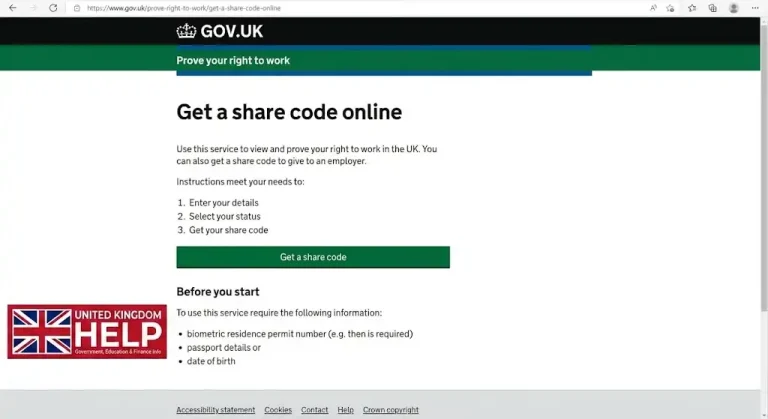
Go to the official right-to-work service and avoid entering your passport, BRP or UKVI details on unofficial websites.
Start the verification process:

Follow the instructions on the screen to sign in or confirm your identity using the information requested by GOV.UK.
Choose the correct purpose:

When asked why you need a share code, select “prove your right to work to an employer.” This ensures you receive the correct type of code.
Generate your code:

After completing the required steps, the service will provide a nine-character share code. A right-to-work code starts with W.
Give the code to your employer:
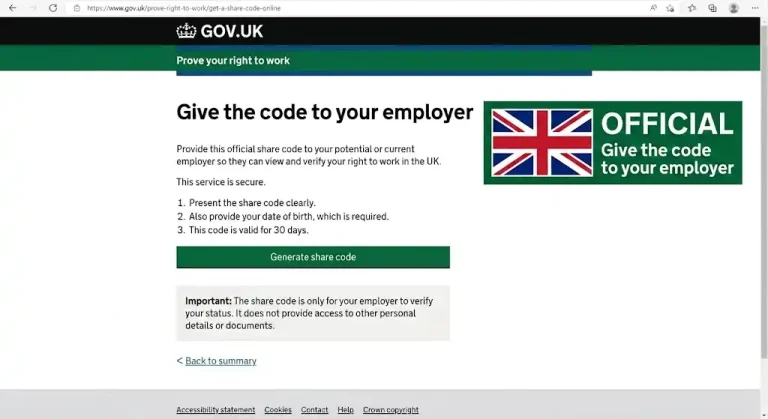
Provide your employer with the share code and your date of birth so they can complete the official right-to-work check.
Let your employer verify your status:
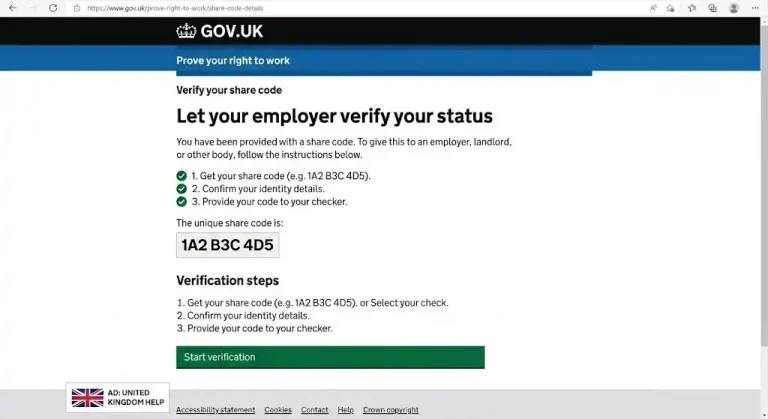
The employer can use the official checking service to view your relevant work permission, including any restrictions and, where applicable, how long you are permitted to work in the UK.
What You Need Before Starting
Having the correct details ready can make the process smoother. Depending on your circumstances, you may be asked for your:
If your immigration status is held as an eVisa, you will normally access it through the details linked to your UKVI account.
What Should You Give Your Employer?
You normally only need to provide:
You do not normally need to send your entire eVisa record. The employer uses the official Home Office service to carry out the check.
Useful tip: If your employer says the code does not work, first check that you generated a W code, that the code is still valid, and that the date of birth has been entered correctly. If everything is correct but the problem continues, check your UKVI account and eVisa information before assuming there is an issue with your immigration permission.
Who Can Get a Share Code Online?
You may be able to get share code online if you are eligible to use the Home Office digital immigration services.
GOV.UK says the right-to-work service can be used by people who are not British or Irish citizens, as well as certain British or Commonwealth citizens who have a digital certificate of entitlement proving their right of abode.
You may have a UK Visas and Immigration (UKVI) account if you have previously:
For the right-to-work service, GOV.UK says you may need your BRP number, passport details or national identity card information.
If you cannot use the online service, there may be another way to prove your status, including eligible immigration documents. The appropriate alternative depends on your circumstances.
Which Share Code Do You Need?
Before you get share code, first think about why you need to prove your UK immigration status. The right code depends on who is requesting it and what they need to check.
|
Your situation |
Code or service you need |
|---|---|
|
Starting a new job |
Right-to-work share code |
|
Employer checking your work permission |
W share code |
|
Renting a property in England |
Right-to-rent share code |
|
Landlord checking your eligibility |
R share code |
|
General immigration-status check |
Immigration-status share code |
|
Viewing your digital immigration status |
eVisa/UKVI service |
For example, if an employer asks for proof that you can work in the UK, you should generate a right to work share code, not a rental or general status code. Likewise, someone renting a property in England needs the appropriate right-to-rent code.
Remember: share codes are purpose-specific. If you need to prove your status for a different reason, generate a new code and select the correct purpose. Choosing the right service from the start can help you avoid delays or an unsuccessful share code check.
How an Employer Performs a Share Code Check
A share code check is completed by the employer rather than by the employee.
Once you provide your W code and date of birth, the employer opens the official GOV.UK checking service and enters the requested details.
The result can show:
The employer should check the information returned by the Home Office and make sure the photograph matches the person presenting themselves for employment. GOV.UK states that employers must establish that a job applicant is allowed to work before employing them. (GOV.UK)
This means generating a code is only one part of the process. The employer still needs to complete the appropriate check.
What If Your Employer Says the Code Does Not Work?
Ask them to confirm that they are using the right-to-work checking service, not the general immigration-status or right-to-rent service.
Then check the code itself. If it begins with W, it was generated for a right-to-work check.
If the code has expired, generate a new one. If the problem continues, check your UKVI account and eVisa information.
How Long Does a Share Code Last?
A UK share code is generally valid for 90 days from the date it is issued. During those 90 days, it can be used as many times as needed for the purpose for which it was created.
This does not mean your visa or immigration permission lasts for 90 days. The two things are completely different.
For example, suppose your immigration permission lasts for another two years but your W share code was created today. The code will normally expire after 90 days, while your underlying immigration permission can continue according to the conditions and expiry date shown in your immigration record.
If the code expires, simply generate another one when you need to prove your status again.
Can You Generate a New Share Code?
Yes. You can generate a new code when necessary.
A new code is useful if:
Generating a new share code does not automatically invalidate your other valid codes. GOV.UK guidance explains that each code remains usable for its original purpose until it expires.
The key rule is that a new code for one purpose does not turn an old code into a code for another purpose.
Share Code UK Visa: How It Works With an eVisa
If you are searching for share code UK visa, the process is closely linked to the UK’s eVisa system.
An eVisa is a digital record of your identity and immigration status. It can contain information about your permission to stay and relevant rights in the UK.
GOV.UK – View your eVisa and get a share code
Once you can access your eVisa, you can generate a share code for the appropriate purpose. GOV.UK says you will need the details used to sign in to your UKVI account. Depending on your circumstances, this may include a passport, national identity card or biometric residence card.
The person checking your status normally does not need you to send them a copy of the eVisa itself. You give them the relevant share code and date of birth, and they use the appropriate official checking service.
Check Your eVisa Before Sharing Your Status
Before using your digital status for an important employment or housing check, take a moment to review the information displayed.
Look at:
If something appears to be wrong, deal with the problem before relying on the information for an important check.
How to Get a Share Code From Your eVisa
If you already have access to your eVisa, the basic journey is straightforward.
Access Your UKVI Account
Use the official GOV.UK eVisa service and sign in using the details associated with your UKVI account.
Complete Security Checks
You may need access to the email address or mobile number linked to your account so you can complete the security process.
View Your Status
Once inside your account, check that your immigration information appears correctly.
Select the Reason for Sharing
Choose the purpose that matches the request.
For a job, select the right-to-work option.
For a rental in England, select the right-to-rent option.
For another permitted immigration-status check, use the relevant status option.
Give the Code to the Checker
Once the code appears, provide it to the employer, landlord or other relevant organisation. They will use the corresponding GOV.UK service to view the information they need.
Share Code UK Right to Rent
A share code UK right to rent is used to prove eligibility to rent residential property in England.
The process is separate from right-to-work verification.
Eligible people can use the online service if they have a UKVI account or certain eligible immigration documents. GOV.UK also explains that people with a BRP can use it for 18 months after the expiry date printed on the card for accessing the service.
When generating the code, you need the information requested by the service, which can include your date of birth and details from your BRP, passport or national identity card.
What Does the Landlord Do?
The landlord or agent uses the dedicated right-to-rent checking service.
They enter:
An R code is specifically designed for this purpose. GOV.UK guidance confirms that W and S codes cannot be used as substitutes for a right-to-rent code. (GOV.UK)
Important: Right to Rent Only Applies to England
Do not assume that the right-to-rent share-code process applies across the whole UK.
GOV.UK states that landlords do not need to carry out right-to-rent checks for properties in Wales, Scotland or Northern Ireland. The statutory right-to-rent scheme discussed here applies to England.
That distinction is especially important if you are moving between different parts of the UK.
Immigration Status Share Code: What Is It?
An immigration status share code is used when someone needs to check relevant information about your immigration status for a purpose other than the dedicated work or rent checks.
The person checking your status will need your share code and date of birth.
The service can show information such as whether you have the right to live in the UK and relevant restrictions concerning rights, benefits or services. GOV.UK specifically says that a different service should be used when the purpose is checking someone’s right to work or right to rent.
So if an employer asks for proof of your right to work, do not assume that an S code is sufficient. Generate a W code instead.
Can British or Irish Citizens Get a Share Code?
British and Irish citizens generally do not use an online share code to prove their right to work.
GOV.UK says British and Irish citizens cannot get an online share code for right-to-work purposes. Employers can use other accepted methods, including checking eligible original documents or, where applicable, an approved identity service provider.
There are specific situations involving a certificate of entitlement to the right of abode, so people with unusual circumstances should follow the relevant GOV.UK guidance rather than relying on a general rule.
For right to rent, GOV.UK similarly states that British and Irish citizens cannot get a share code and can instead use other accepted ways of proving their status.
Share Code for International Students
International students often need a right to work share code when taking a job in the UK.
Having student immigration permission does not automatically mean that every type of employment is permitted. Your immigration conditions determine what work you can undertake and whether restrictions apply.
If an employer asks you to prove your right to work, generate a W code through the official service and let the employer view the information returned by the Home Office.
This is safer than trying to explain your work conditions yourself because the employer’s official check is designed to show the relevant permission and restrictions.
What If Your Share Code Is Not Working?
A failed share code check does not automatically mean that you have lost your immigration status.
There are several practical things to check first.
Check the Purpose
Look at the first letter.
- W = work
- R = rent
- S = other status check
If you are applying for a job and supplied an R or S code, generate a W code.
Check the Expiry Date
Remember that share codes last 90 days. If the code is older than that, generate a new one.
Check the Date of Birth
The person checking your status normally needs your date of birth as well as the code. An incorrect date can prevent the service from finding the correct record.
Check the Correct GOV.UK Service
An employer should use the right-to-work checking service. A landlord in England should use the right-to-rent checking service. A general immigration-status checker should not be substituted for either of these when the purpose requires a dedicated check.
Check Your eVisa
If your eVisa contains incorrect information or you cannot use it to generate a share code, use the relevant GOV.UK support or error-reporting route.
Do not ignore a serious error in your immigration record, particularly when it could affect employment or housing.
What If You Cannot Access Your UKVI Account?
If you cannot access your account, start by checking whether you are using the identity information associated with the account.
You may also need access to the contact details linked to your account for security verification.
If your phone number or email address has changed, make sure your UKVI account information is updated where the service allows you to do so.
If you can sign in but your eVisa is missing or displays incorrect information, use the appropriate GOV.UK support service rather than creating multiple accounts unnecessarily.
What If the Information on Your eVisa Is Wrong?
An incorrect digital immigration record can cause problems when an employer or landlord carries out a check.
If you notice an error, use the official GOV.UK eVisa error-reporting service.
Check details such as your name, date of birth, nationality and immigration information. The precise process and information requested can vary depending on the error.
Most importantly, do not assume that a technical problem with your share code means your underlying immigration permission has disappeared. The share code is only the access mechanism; your immigration status is held separately in the Home Office system.
Common Share Code UK Mistakes to Avoid
Many problems can be prevented before they happen.
Giving an Employer an R Code
An R code is for right to rent, not employment.
If your employer needs a right-to-work check, generate a W code.
Using an Old Code
A code that has passed its 90-day validity period cannot be used for a new check.
Generate another one.
Using a General Status Code for Employment
An S code is not a replacement for a W code when the employer needs to conduct a right-to-work check.
Sending Only a Screenshot
A screenshot may not provide the employer or landlord with the information needed to complete the official check. Give them the share code and date of birth so they can use the appropriate GOV.UK service.
Using an Unofficial Website
Immigration information is sensitive. Use GOV.UK services whenever possible and avoid entering passport, BRP or UKVI details into websites that are not official government services.
Assuming the Share Code Is Your Visa
It is not. The code provides temporary access to selected information. Your actual immigration permission remains in your Home Office record.
Is a Share Code Safe to Give Someone?
A share code is designed to be given to the person or organisation carrying out the relevant check, but you should still treat it as sensitive information.
Only provide it to the intended employer, landlord or other legitimate organisation.
The information visible to the checker depends on the purpose you selected. GOV.UK explains that when you generate a share code, you are told what information the person checking it will be able to see.
There is no reason to publish your code publicly or send it to unrelated people.
Can You Use One Share Code More Than Once?
Yes. A valid code can generally be used multiple times during its 90-day validity period.
For example, if you are applying for several jobs, you may be able to give the same valid W code to multiple prospective employers during that period.
However, the code remains limited to its original purpose. If you move from a job application to a rental application, generate a separate R code for the right-to-rent check.
Quick Comparison: Work, Rent and Immigration Status
|
Feature |
Right to Work |
|---|---|
|
Main user |
Employer |
|
Prefix |
W |
|
Purpose |
Employment |
|
Date of birth needed |
Yes |
|
Validity |
90 days |
|
Can it replace another code? |
No |
The exact information displayed depends on the service and your immigration record, but the purpose-specific nature of the codes remains the key point. (GOV.UK)
Best Practices Before You Get a Share Code
A few minutes of preparation can make the process much smoother.
Know the purpose first. If the request came from an employer, you need the right-to-work service. If it came from a landlord for a property in England, use right to rent.
Check your digital status. Make sure your name, date of birth and immigration permission look correct.
Keep your UKVI access details available. You may need your passport, identity card or other account information.
Do not panic if an old code expires. A new code can be generated.
Use official services. GOV.UK is the safest starting point for generating and checking a UK immigration share code.
Give the checker what they actually need. Usually that means the code and your date of birth rather than a collection of unrelated immigration documents.
Official GOV.UK Share Code Links
For convenience, these are the main official services you may need:
FAQs
Conclusion
Getting and using a Share Code UK is a simple way to prove your digital immigration status when you need to work, rent or complete another official status check. The key is to choose the correct purpose, generate the appropriate code and give it to the organisation carrying out the verification. For employment, make sure you provide a right to work share code and your date of birth so your employer can complete the official check. If a code expires or does not work, you can get share code online again through GOV.UK. Always use the official government service and check that your eVisa and UKVI details are accurate to avoid unnecessary delays.