
Patient portal NHS login is the easiest starting point if you want to check NHS services online, manage GP appointments, view available prescriptions and test results, read messages, or access parts of your GP health record. The official NHS patient portal service is provided through the NHS App, which you can use on a smartphone, tablet, or computer without necessarily downloading the app. NHS portal login is also useful when you need to recover your account, complete identity verification, or troubleshoot missing records and appointments. If you’re looking for the correct patient portal NHS login, use the official NHS App rather than an unofficial third-party website.Visit our Homepage for more information.
What Is the NHS Patient Portal?
Patient portal NHS login is the starting point for accessing NHS services online through the official NHS App, including GP appointments, repeat prescriptions, available test results, parts of your health record, appointment information, NHS messages and other supported services. If you are searching for NHS patient portal login, it is important to know that the NHS does not operate one single portal containing every patient’s complete healthcare information. Instead, the services available after patient portal NHS login depend on your GP surgery, identity verification, connected healthcare systems and the online services enabled for your account. This means your NHS patient portal may show different options from another patient’s account.
NHS App, NHS Website and NHS Login: What’s the Difference?
These terms are related but aren’t identical.
|
Service |
Main purpose |
|---|---|
|
NHS App |
Access NHS services through a smartphone or tablet |
|
NHS App online |
Use NHS App services through a web browser |
|
NHS login |
Secure account used by supported health and care services |
|
GP online services |
Additional services provided according to your GP surgery |
|
Hospital patient portal |
May provide hospital-specific information and appointments |
This distinction is useful if you search for NHS portal login and expect every healthcare provider to appear in the same account. NHS login app can also be used by supported health and care websites and apps, while some hospitals operate their own patient-facing portals.
How to Create an NHS Login
Patient portal NHS login starts with creating a secure NHS login account that can be used to access supported NHS services. If your goal is to check appointments, prescriptions, test results, messages or available health-record information, the easiest approach is to begin with the official NHS App service. The process is straightforward, but you should use your own accessible email address, protect your password and complete any verification requested. Below is a short, user-focused guide to help you create your NHS patient portal login safely and avoid common account or verification problems.
1. Open the Official NHS App

Start your patient portal NHS login through the official NHS service rather than an unfamiliar website.
2. Continue to NHS App Services

After opening the service, continue with the available NHS patient portal login options.
3. Enter Your Email Address
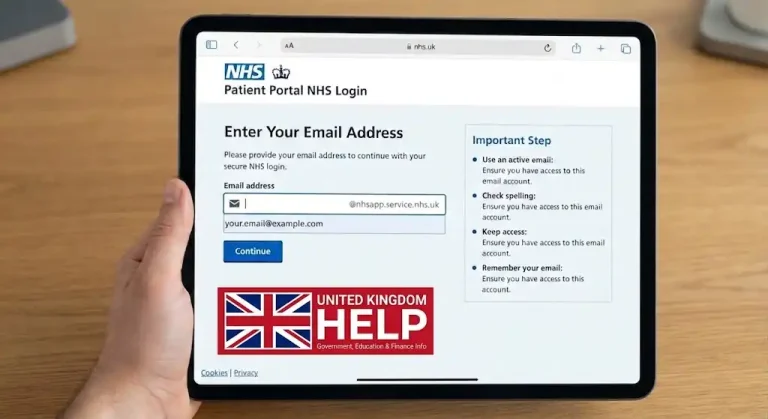
Your email address is an important part of your patient portal NHS login and may be needed to manage your account.
4. Create Your Password
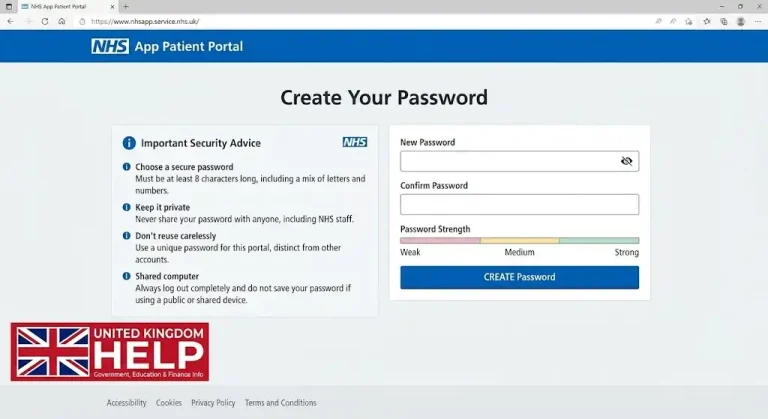
Create a secure password for your NHS patient portal login and keep it private.
5. Verify Your Contact Details
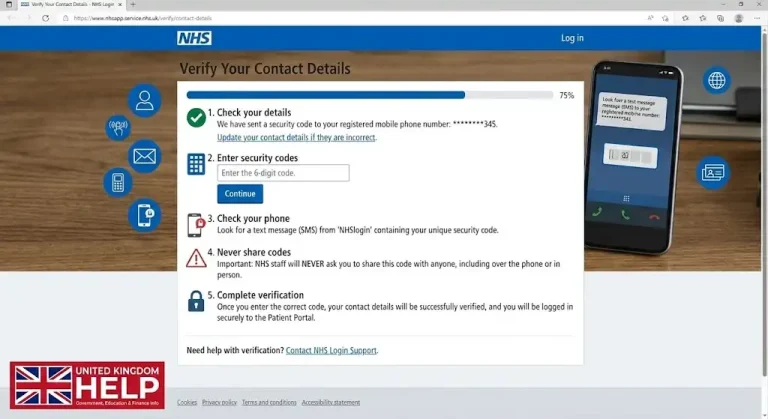
Verification helps complete your patient portal NHS login and may involve your email address or telephone number.
User-intent tip: If you’re creating an NHS patient portal login specifically to access medical records, creating the account may not be the final step. Additional identity verification may be required before personal health information becomes available.
Who Can Use Patient Portal NHS Login?
Before starting patient portal NHS login, check the basic eligibility requirements. NHS App services are generally available to people who:
Having an account doesn’t automatically mean you will receive access to every NHS service. Your GP surgery and the healthcare systems it uses determine which functions and information are available.
What Do You Need for NHS Login?
Depending on the service, you may need:
NHS login registration uses an email address and telephone contact details. Accessing personal health information can require additional identity information.
What Does a Patient Portal NHS Login Text Message Mean?
A patient portal NHS login text message can refer to more than one type of SMS.
One possibility is a security code used during NHS login verification. Another is an SMS notification telling you that you have received a secure NHS App message.
These are not necessarily appointment reminders or texts containing medical information. In some circumstances, the SMS simply tells you to open the NHS App or sign in through the NHS website to view the actual message.
Patient Portal NHS Login Text Message Not Arriving
If your patient portal NHS login text message doesn’t arrive, check:
If you request several codes, use the newest valid code rather than an older one.
For further technical assistance, use the official NHS App Help Centre:
How NHS Identity Verification Works
Creating an NHS login isn’t necessarily the same as receiving full access to your health information. NHS login app uses identity verification to establish that the person requesting access is the correct patient.
Depending on the circumstances, verification may involve photo identification or information connected with your GP registration.
For example, GP registration details can include your NHS number, date of birth and the postcode registered with your GP. If you don’t know your NHS number, another identification route may sometimes be available.
Photo ID Checks
If NHS login asks for photo identification, follow the instructions shown on screen carefully.
Use clear images and make sure the requested information is visible. If verification fails, check the information before trying again rather than repeatedly submitting unclear photographs.
Not everyone needs photo ID. The verification method depends on your circumstances and the level of access required.
Can You Use NHS Patient Portal Login Without the App?
Yes. You don’t have to install the NHS patient portal app to use NHS App services.
The NHS provides a browser-based version that can be used on a supported computer, phone or tablet. This is particularly useful if you prefer a larger display, don’t want another application on your phone or need to access your healthcare information from a computer.
The web version doesn’t offer every mobile feature. For example, fingerprint and face authentication are app-based features, although passkeys can be used on the web.
What Can You Do After Patient Portal NHS Login?
Once your patient portal NHS login is established and the necessary verification is complete, the NHS App can bring several everyday healthcare tasks together.
Check GP Appointments
You may be able to view, book or manage GP appointments when your surgery provides online appointment services.
A typical route is:
The exact choices depend on your GP surgery. Not every practice provides the same online booking functions.
If a healthcare provider has confirmed an appointment but it isn’t visible after NHS patient portal login, contact the provider rather than assuming the appointment has been cancelled.
Ask Your GP About a Health Problem
Where your GP surgery offers the service, you may be able to use:
Appointments → Book an appointment → Ask about a health problem
You can then answer questions about your concern, allowing the surgery to review the information and decide on the appropriate response.
This isn’t available at every practice. Online GP requests are also not intended to replace emergency care. For urgent problems, follow the NHS urgent-care guidance provided by your GP surgery; for emergencies, use emergency services rather than waiting for an NHS App response.
Accessing Medical Records
The NHS patient portal can provide access to parts of your GP health record.
Depending on your access, you may see:
The NHS explains that access to detailed GP information can vary, particularly for older records. Seeing some information after nhs patient portal login doesn’t necessarily mean your complete historical medical record is available online.
Viewing GP Appointment Notes
To look for appointment information:
Depending on your access, notes can include information from face-to-face, telephone or online appointments, referrals, forms, test results and messages from your GP surgery.
If something appears incorrect or is missing, contact your GP surgery. Don’t attempt to alter the medical record yourself.
Checking Test Results
Test results are another common reason people use the nhs patient portal app.
Depending on the connected systems, the NHS App may show GP-ordered results and some hospital-ordered results. Available information can include blood tests, urine tests and tissue biopsies.
To check results:
Older results may not appear automatically. The source material notes that tests carried out before October 2023 may not appear automatically, so contact your GP surgery if you need an older result.
The NHS also states that test results cannot currently be downloaded directly from the NHS App. If you need a copy, contact your GP surgery.
Managing Repeat Prescriptions
After patient portal NHS login, eligible users may be able to request repeat prescriptions through the NHS App.
The general process is:
Not every medicine can be requested online. Certain medicines or medicines subject to specific surgery arrangements may require another route.
You can also use the Prescriptions section to track requests. If you have a nominated pharmacy, the NHS source states that prescriptions usually take around 3–5 days to be ready, although circumstances can vary.
Reading NHS Messages
The NHS patient portal experience can also include messages from healthcare providers.
Depending on your circumstances, messages may come from:
To check them:
The App can allow messages to be filtered, flagged, removed and restored. Removing a message from the visible inbox does not permanently delete it.
Changing NHS Login Details
If you need to update your NHS login settings, the current route is:
Profile → Contact and login details → Login and security
Depending on your account and device, you may be able to:
Your NHS login details are separate from general contact details, so changing one doesn’t automatically change the other.
What Does “Continue With NHS Login” Mean?
You may see continue with NHS login when using another supported health or care service.
It means that the service uses NHS login as its authentication method. NHS login can work with a range of supported health and care websites and applications, not just the main NHS App.
However, seeing continue with NHS login does not mean every website displaying the option is itself an NHS website. Always check which organisation operates the service and make sure it is a supported NHS login service.
Common Patient Portal NHS Login Problems
A successful patient portal NHS login doesn’t guarantee that every service will appear.
|
Problem |
What to check |
|---|---|
|
Medical records missing |
Check GP record access and identity verification |
|
Test result missing |
Check whether it was older, private, hospital-ordered or unsupported |
|
Appointment missing |
Confirm details with the GP or healthcare provider |
|
Repeat prescription unavailable |
Check whether the medicine is eligible for online requests |
|
Security text doesn’t arrive |
Check your phone number, signal and SMS settings |
|
Message isn’t visible |
Open Messages and check notification settings |
|
Login works but access is limited |
Additional identity verification may be required |
The key is to identify whether the problem concerns your account, identity verification, the NHS App itself or your healthcare provider.
NHS Patient Portal Login Not Working
If patient portal NHS login isn’t working, don’t immediately create a second account.
Try this sequence:
Forgot Your NHS Login Password?
A forgotten password can prevent nhs patient portal login.
Use the password-recovery option provided during NHS login and follow the verification instructions. Don’t give your password to another person who claims they can recover the account for you.
If you’re already signed in and want to change the password, use:
Profile → Contact and login details → Login and security → Change password
The same area can also provide options for changing your login email address and security telephone number.
Patient Portal NHS Login Email Changed
If you have changed your email address, don’t create a duplicate NHS login simply because your old address is no longer suitable.
When signed in, go to:
Profile → Contact and login details → Login and security
From there, you can change the NHS login email where the option is available. Remember that the login email is separate from other contact information stored in your NHS App profile.
Why Are Medical Records Missing?
Completing NHS patient portal login doesn’t mean every record will automatically appear.
Your GP surgery may not have enabled a particular service, may restrict certain sensitive information, may use a system that doesn’t display particular records, or may have changed your access after you moved GP surgeries.
Hospital information can also depend on whether the provider makes that information available through the connected system.
If information is missing:
A missing record doesn’t necessarily mean there is something wrong with your NHS login.
NHS App After Changing GP Surgery
Changing GP practices can affect what appears in your NHS App account. Information from a previous GP surgery may not automatically transfer in the way you expect.
If you’ve recently registered with a new GP and your records look different after patient portal NHS login, contact the new surgery for advice rather than creating another NHS account.
Patient Portal NHS Login Security Tips
Your NHS account can contain sensitive healthcare information, so account security should be taken seriously.
Follow these basic practices:
If you receive a patient portal NHS login text message that asks you to enter sensitive information on an unfamiliar website, don’t follow the link automatically. Open the NHS App directly instead.
Why Does My NHS App Look Different?
The NHS App interface has been updated during 2026. The current design uses three principal areas:
Older guides may therefore use labels that no longer match your screen. For example, older instructions may refer to an Account area while newer versions use Profile.
If a menu option isn’t where an older guide says it should be, check the current NHS App Help Centre before assuming there is a problem with your account.
NHS App Notifications
Notifications can help you notice new NHS messages.
The current route is:
Profile → Notifications → Device settings
Follow the instructions for your device. NHS guidance states that notification changes can take up to 24 hours to take effect, and notifications need to be enabled separately on each device if you use the NHS App on multiple devices.
Be careful with shared devices because another person using the device could potentially see NHS App notifications.
NHS App vs Hospital Patient Portals
Searching for nhs patient portal login can be confusing when a hospital gives you a separate portal address.
The NHS App provides general NHS services, while hospitals can use their own patient engagement systems. NHS login can also authenticate users on supported external health and care services.
Therefore, don’t assume that every hospital record will appear inside the NHS App simply because you have completed patient portal NHS login.
Official NHS Links for Patient Portal NHS Login
For regular users, bookmarking official NHS resources can be safer than relying on search results or links received through text messages.
These official resources are particularly useful when your nhs portal login succeeds but a specific function is unavailable.
Final Patient Portal NHS Login Checklist
Before contacting support, check the following:
FAQs
Conclusion
Patient portal NHS login is the easiest place to start when you want quick access to NHS App services such as GP appointments, prescriptions, available test results, messages and parts of your GP health record. If your NHS patient portal login is not working, a verification code is missing, or your records or appointments are not showing, the problem may be related to your account, identity verification, GP surgery or healthcare provider. You can also use the NHS App through a web browser without installing the NHS patient portal app. For the safest and most accurate help, always use the official NHS service rather than unfamiliar links or duplicate accounts.