
If you’re looking for a practical way to support a child with reading, spelling or phonics, Nessy offers structured literacy activities designed to make learning more engaging and manageable. Whether you need help with Nessy login, want to understand Nessy Classroom, or are exploring Nessy Reading and Spelling for the first time, knowing where to start can save time and confusion. For parents, teachers and new visitors, the official UK website is the best starting point for checking current programme information and access options. This guide explains the essentials in a straightforward way, from student access and classroom use to choosing the right learning resources, so you can find the information you need without unnecessary steps.Visit our Homepage for more information.
What Is Nessy?
If you’re trying to understand Nessy Learning, or the Reading and Spelling programme before choosing a resource for a child, the platform provides online learning activities focused on both literacy and numeracy. Its Reading and Spelling programme is mainly aimed at children aged 6 to 11, covering learning broadly across Years 1 to 6. It was developed at the Bristol Dyslexia Centre by specialists and has been used internationally since 1999. Although many people search for it because of its connection with dyslexia support, its structured activities can also be useful for children who need extra practice with phonics, spelling, vocabulary, reading fluency or comprehension. For parents, teachers and schools, the main benefit is having an interactive learning environment that supports practice while providing ways to organise student access and follow learning activity.
Where Should You Start?
The first step depends on how the child receives it. Access may be provided through a school, teacher, tutor or home subscription, so the adult managing the account generally needs to configure the learner before they can begin.
For schools and educators, Classroom is the central management area. It replaced the previous Admin & Reports system and provides tools for managing students, groups, programmes, reports and account information.
Access the Official Nessy Website
Use the official UK website when you need to reach services:
Official website
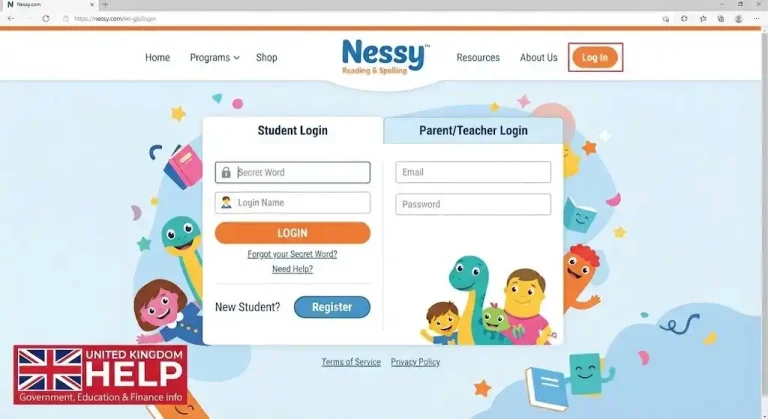
If you’re a student or parent looking for the learning games, choose Log in to learn. Teachers and administrators who need to manage learners should use Login to Classroom instead.
Keeping these two areas separate is useful because a Classroom account is primarily for managing learners, while the learning login takes the student into their assigned activities.
How Does Nessy Classroom Login Work?
Teachers and administrators can sign into Classroom using their registered email address and password. Microsoft sign-in is also supported.
If you’ve used the previous Admin & Reports system, Nessy states that the same login details can be used for Classroom.
If you’ve forgotten your password, select Forgotten Password? and follow the reset instructions. Didn’t receive the email? Check your spam or junk folder before trying the reset again.
Setting Up a Student
Once you’re inside Classroom, the next priority is making sure the learner has the correct access. The platform gives teachers tools to manage students and groups, assign programmes and review activity.
A typical setup looks like this:


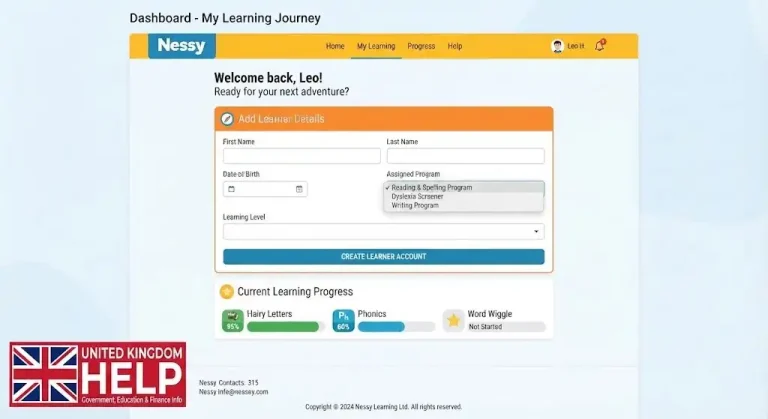


For larger classes, Classroom also provides bulk-management options, which can save teachers from making the same change to every student individually.
How Does a Student Log In to Nessy?
Student access can look different from a conventional website account. Instead of expecting a child to remember a complicated email address and password, it uses child-friendly login methods.
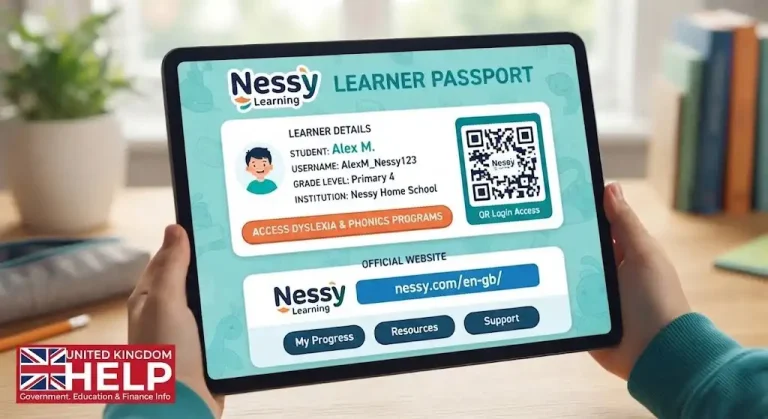
Students may use a Key, a Secret Word with Emojis, or a QR code depending on how their account has been configured.
The student’s login information can be accessed through Edit Student Login within Classroom. A Nessy Passport can also be saved as a PDF or printed, giving the child an easy reference when they need to sign in.
|
Login method |
Useful for |
|---|---|
|
QR code |
Younger learners |
|
Secret Word + Emojis |
Classroom use |
|
Key |
Individual access |
After successful login, the learner reaches the Tap a Panel screen and can choose an available programme.
What Does Nessy Reading and Spelling Teach?
Reading and Spelling is one of the platform’s main literacy programmes. It is aimed at children aged 6–11 and covers several years of literacy development.
Rather than treating spelling as an isolated exercise, the programme connects spelling with reading and phonics while also moving into areas such as vocabulary, morphology and comprehension.
This structured progression can be useful for children who need regular practice with foundational literacy skills. It gives them an environment where learning activities can be repeated and developed over time.
Before Your Child Starts
A few checks can prevent unnecessary login problems:
For parents, the main thing to remember is that the adult account and student learning access serve different purposes. Once the classroom setup is complete and the child’s login details are ready, getting into the learning environment should be much more straightforward.
What Students Do After a Nessy Login
A typical session is built around short learning activities rather than a long lesson. A child may listen to an explanation, watch an animated example, complete an interactive task and then repeat a skill that needs more practice.
This makes the platform particularly useful when a learner struggles to stay engaged with conventional written exercises. The aim isn’t simply to keep the child entertained; activities are intended to give repeated opportunities to practise reading and spelling skills.
A simple routine can be:
Log in → open the assigned programme → complete the activity → practise the target skill → review progress.
Parents and teachers can make the experience easier by showing younger children how to navigate the platform before expecting them to work independently.
Understanding Nessy Reading and Spelling
Reading and Spelling focuses on several areas of literacy development, including phonics, spelling, morphology, vocabulary and comprehension. The programme is structured so that learners can work on skills progressively rather than attempting everything at once.
This matters because two students using it may be working on completely different activities. One child might still be developing basic sound recognition, while another may be practising more advanced spelling patterns. Their screens and progress should therefore be considered in the context of their own learning needs.
Parents and teachers can look for practical improvements such as:
Digital activity should support wider literacy teaching rather than replace it.
What Teachers Can Do Through Nessy Classroom
For educators, Classroom provides the management side of the learning experience. Depending on the account and programmes available, teachers can manage students and groups, check programme access and review available activity or reporting information.
This can be particularly useful when an entire class is using the same school subscription. Instead of troubleshooting each student’s account separately, a teacher can first check whether the correct learner profile and programme have been set up.
If a child completes their login but cannot find the expected activity, check the student profile, assigned programme, group and available subscription before creating another account.
Forgotten Student Login Details? Check the Nessy Passport
A common problem in classrooms is simply forgetting how to access an account. Teachers or administrators can check student login information through the relevant Classroom tools. it’s support information also refers to the Passport, which can be saved or printed for a student’s use.
For younger learners, having the correct information available in one place can make the beginning of a lesson much smoother. It also reduces the need for a teacher to manually enter login details for every child.
Student login information should still be treated as private and managed according to the school’s normal data-protection procedures.
Login Not Working? Try These Checks
If a login fails, don’t immediately assume that the account is broken. Start with the basics.
Check the student’s details. Make sure the Key, Secret Word, QR code or other login information belongs to the correct learner.
Use the right access area. Students should enter through the learning environment, while teachers use the appropriate Classroom route for administration.
Test the internet. If the platform or activities are loading slowly, open another website to see whether the wider connection is working.
Check sound. Literacy activities may rely on audio, so check the device volume, browser settings, headphones and mute controls.
Try a supported browser. It recommends Google Chrome for its programmes, so using a suitable browser can help when activities do not load or play correctly.
When the Expected Programme Is Missing
Sometimes the student can successfully enter it but doesn’t see the activity their teacher expected. This is usually worth checking from the adult account.
Confirm that the correct student profile is open, the intended programme has been assigned and the learner has access through the relevant subscription or licence. If a change has just been made, refreshing or restarting the session may also help.
Creating duplicate accounts should not be the first solution. Separate profiles can make progress harder to track and create additional confusion.
Making More Useful at Home
Parents can get more from learning by connecting online practice with ordinary reading and spelling activities. For example, after completing a spelling exercise, a child could practise the same pattern with a few handwritten words or find examples while reading a short book.
A home routine doesn’t need to be complicated:
|
Stage |
What to do |
|---|---|
|
Start |
Complete the login |
|
Learn |
Open the assigned activity |
|
Practise |
Work through the interactive tasks |
|
Review |
Ask what the child has learned |
|
Follow up |
Use a short offline reading or spelling exercise |
Consistency is usually more useful than simply extending screen time.
What Parents Should Do If a Child Gets Frustrated
If an activity becomes difficult, avoid turning the session into a test. Ask the child which part is causing trouble, whether the instructions are clear and whether they need a short break.
Repeated difficulty may also be a reason to speak with the child’s teacher or learning specialist. It can form part of literacy support, but it should be considered alongside classroom teaching, assessment and other support the learner may receive.
Nessy Learning: Key Things to Remember
Before starting, check that the student’s account is active, the correct programme is available and the child has their appropriate login information. A reliable internet connection, working audio and a compatible browser can prevent many avoidable problems.
For teachers, Classroom is useful for managing student access and reviewing available learning information. For students, the objective is straightforward: complete the login, practise the assigned skills and build confidence gradually.
If you’re looking specifically for login, use the official website and the login route provided for your account. For information about Reading and Spelling, check the programme details and use the resources in line with the learner’s wider literacy goals.
Build a Routine That Fits the Learner
There is no single weekly schedule that suits every child. Age, ability, attention span, schoolwork and individual learning needs all vary.
Rather than focusing only on screen time, combine with other activities:
|
Activity |
Purpose |
|---|---|
|
Regular digital practice |
Reinforces target skills |
|
Reading away from the screen |
Applies literacy in real situations |
|
Spelling and writing |
Builds practical use of learned patterns |
|
Adult discussion |
Helps identify areas needing support |
|
Breaks and variety |
Keeps sessions manageable |
Consistency matters more than forcing a child through a rigid timetable.
How to Interpret Progress
Available progress information can help teachers and parents decide what support may be useful, but it should always be viewed in context.
A child having difficulty during one session does not necessarily mean there is a wider problem. Similarly, completing a large number of activities does not automatically prove mastery.
Look for repeated patterns. If a learner consistently struggles with a particular spelling pattern or skill, that may be a reason to provide further explanation or practise the concept away from the platform.
The useful question is not simply, “How much did the child complete?” It is, “What should we do next based on what we’re seeing?”
Dyslexia-Related Learning
Parents searching for dyslexia learning resources should understand the difference between educational practice and screening.
It includes Dyslexia Quest, described in the supplied information as a game-based screening resource involving areas such as working memory and auditory processing. A screening activity is different from a programme designed to teach reading or spelling.
A screening result should therefore be considered as part of a wider picture. It should not be treated as a standalone diagnosis.
If a child continues to have substantial reading or spelling difficulties, parents should discuss their concerns with the child’s teacher or an appropriate educational professional.
Nessy Numbers and Other Programmes
It also includes Numbers, which is aimed at mathematical learning and can be relevant for learners experiencing numeracy difficulties.
The resources available to a learner can depend on the subscription, account configuration, programme and other factors. Do not assume that every child will see exactly the same activities.
Troubleshooting
If a child suddenly cannot complete a login, work through the basics before contacting support.
First, confirm that the student is using the correct account and current login information. An older Passport may no longer be valid if details have changed.
Next, check that the student is entering through the correct route. Student access and Classroom access serve different purposes.
If login details appear correct, test the internet connection and browser. When the programme opens but sound is missing, check device volume, headphones and browser permissions.
FAQs
Conclusion
Nessy login or Classroom, the easiest way to avoid confusion is to begin with the official Nessy service and use the access route that matches your role. Students generally need their assigned learning login, while teachers and administrators use the classroom environment for managing learners. Keep login details private, make sure the child is using the correct account, and combine it activities with everyday reading, writing and spelling practice rather than relying on screen-based learning alone. If you experience an access or technical problem, check the device, browser, internet connection and account details first, then use the official support resources if the issue remains. One useful search tip is to remember that it is different from Nessie, the name commonly associated with the Loch Ness Monster; using the correct spelling and official website can help you reach the intended learning resources quickly.