
Learning mathematics becomes more enjoyable when children can explore numbers, solve challenges and receive immediate feedback. However, parents and teachers do not always need expensive subscriptions or complicated learning software to make lessons more interactive.
Topmarks provides a collection of free educational games and interactive learning resources designed mainly for primary school children. Its activities cover mathematics, English, phonics and other curriculum subjects, giving families and teachers another way to support everyday learning.
From number bonds and multiplication to fractions, shapes and money activities, the website offers different ways to practise important skills. Popular options include Hit the Button and Daily 10, which help children develop confidence with mental arithmetic.
Whether you are a parent looking for educational games for kids or a teacher planning a short classroom activity, Topmarks offers resources worth exploring. The key is choosing activities that match the child’s current learning needs rather than simply playing games without a purpose.
What Is Topmarks and How Does It Work?
Topmarks is a UK educational website that provides interactive learning games and teaching resources, particularly for children in primary education. Established in 1998, it has developed into a resource library used by teachers, parents and pupils.
Its main strength is making educational practice accessible through a standard web browser. Children can select activities according to their age, year group or subject without creating a conventional student account for the free website games.
The platform is especially useful for practising mathematical skills. Children can work on counting, addition, subtraction, multiplication, division, fractions and other topics through interactive activities.
Topmark also includes learning materials outside mathematics, such as:
Rather than following a complete teaching programme, Top mark works best as a supplementary learning resource. Teachers can introduce a mathematical concept first and then use a suitable game to reinforce what pupils have learned.
Important Features at a Glance
| Feature | What to Expect |
|---|---|
| Website access | Browser-based educational resources |
| Cost | Free access to website games |
| Main audience | Primary school children |
| Main subject | Mathematics |
| Other subjects | English, phonics, science and more |
| Popular activities | Hit the Button and Daily 10 |
| Login requirement | No conventional account needed for free website games |
| Devices | Computers, tablets and interactive whiteboards |
| Main purpose | Practice, revision and classroom engagement |
Why Parents and Teachers Use Topmarks
A useful educational resource should make learning easier without creating additional work for teachers or parents. This is one reason Top mark remains a practical option for everyday classroom activities.
Its games can be introduced quickly, and children receive feedback while completing different challenges. Teachers can also select activities that connect with the topic being taught in class.
Here are some of its main advantages.
1. Free Educational Activities
One of the biggest attractions is that the website’s educational games are available without a subscription. Schools and families can use these resources without purchasing a premium website membership.
This makes Topmark games free to access for ordinary practice at home or school. Some separate applications, including the Hit the Button app, may have a purchase cost, so website games and paid apps should not be confused.
2. Supports Primary Mathematics
The maths section provides activities covering several important areas of the primary curriculum.
Children can practise:
This variety helps teachers select activities according to the subject being covered in class.
3. Immediate Feedback
Interactive games allow children to see whether their answers are correct. This helps them recognise mistakes and try different approaches.
For example, a child practising multiplication may discover that they repeatedly struggle with the seven times table. A teacher can then provide additional practice instead of moving immediately to a more difficult topic.
4. Classroom and Home Learning
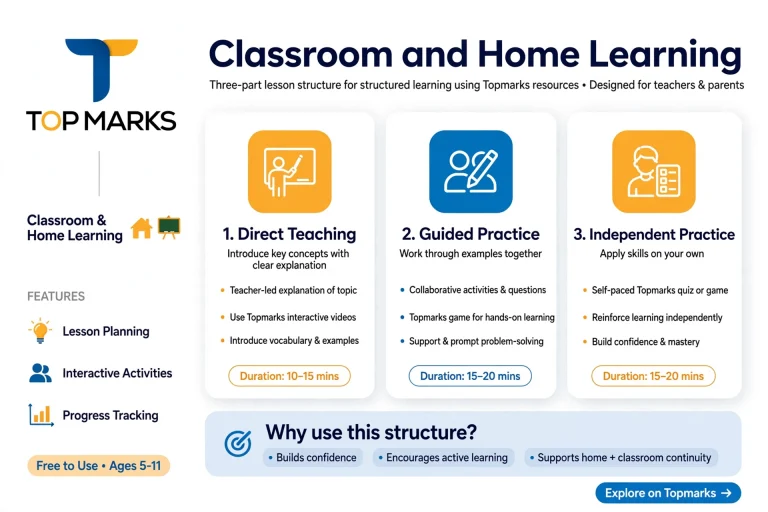
The same general collection of website resources can be used in different learning environments.
Teachers may display a game on an interactive whiteboard, while parents can open suitable activities on a computer or tablet. Children can also practise independently once they understand the instructions.
5. Encourages Independent Practice
Children can explore activities and repeat challenges without waiting for a teacher to prepare a new worksheet every time.
However, independent practice should still have a clear purpose. Parents and teachers can ask children to explain how they reached an answer, helping them develop mathematical understanding rather than focusing only on scores.
Exploring the Best Topmarks Maths Games
Mathematics is one of the strongest areas of the website. Its collection includes activities for younger children learning to recognise numbers and older primary pupils working with multiplication, fractions and more advanced calculations.
The best choice depends on what a child needs to practise.
Topmarks Hit the Button: Quick Mental Maths Practice
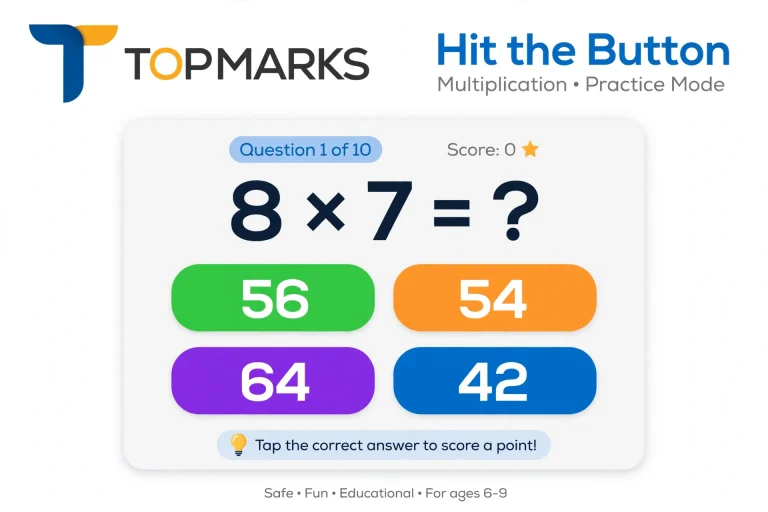
<PRIVATE_PERSON>Hit the Button</PRIVATE_PERSON> is one of the best-known activities associated with Topmark. It is a fast-paced number game that helps children practise essential mathematical facts.
Players see a question and select the correct answer from the available choices. Different activities cover a range of mathematical skills, making it useful for both introductory practice and revision.
The game includes exercises involving:
For example, a child might see a question such as 8 × 7 and need to select 56. Repeating similar exercises helps strengthen the recall of multiplication facts.
How to use Hit the Button effectively
An important feature is the availability of untimed practice options in relevant activities. These are useful for children who need more thinking time before working on speed.
Teachers should remember that answering quickly is not the same as understanding mathematics. After a round, ask children to explain how they solved a question.
Topmarks Daily 10: Customisable Maths Questions
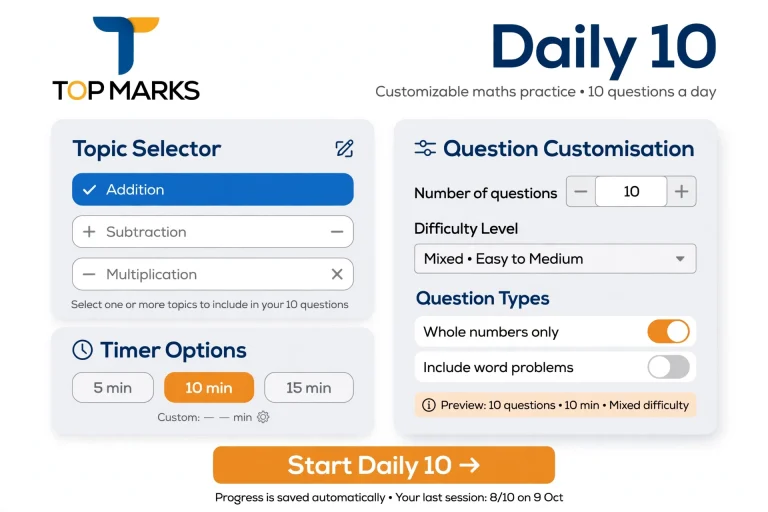
Daily 10 is another useful resource for practising mental arithmetic. Unlike a game focused mainly on rapid recall, it allows teachers to select different mathematical topics and adjust the challenge.
Depending on the selected activity, questions can cover:
Teachers can also adjust the time available for answering questions. The available timing options make it possible to use the activity for different learning objectives.
For instance, a Year 3 teacher might select addition questions involving numbers up to 100. Older pupils could practise more demanding calculations involving multiplication or fractions.
A practical Daily 10 classroom routine:
This approach makes Daily 10 useful for short revision sessions, lesson starters and informal checks of mathematical understanding.
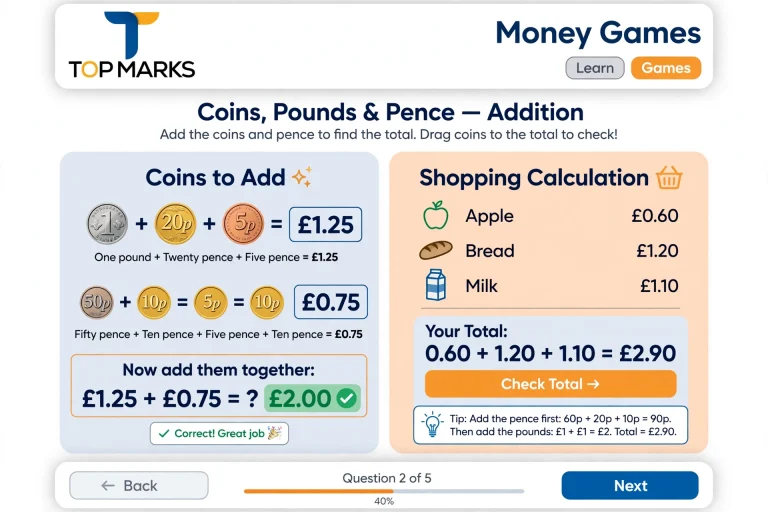
Topmarks Money Games: Learning About Coins and Calculations
Money is an important part of everyday mathematics. Children need to recognise monetary values, understand how different amounts combine and develop confidence when working with prices.
It includes money-related learning activities that can support this area of the curriculum.
Depending on the selected activity, money practice can help children develop skills such as:
For example, parents can introduce a simple shopping exercise by asking a child to calculate the combined cost of two items. A follow-up question about the change from a given amount can connect classroom mathematics with everyday situations.
Teachers can also use money activities on an interactive whiteboard to explain calculations to the whole class.
Learning tip: Do not rely entirely on digital exercises. Giving children real or pretend coins to handle can help connect the numbers on the screen with practical experiences.
Other Useful Topmarks Maths Games
Hit the Button and Daily 10 are popular choices, but they are not the only useful activities.
Different games can support specific learning objectives.
| Maths activity | Main learning purpose |
|---|---|
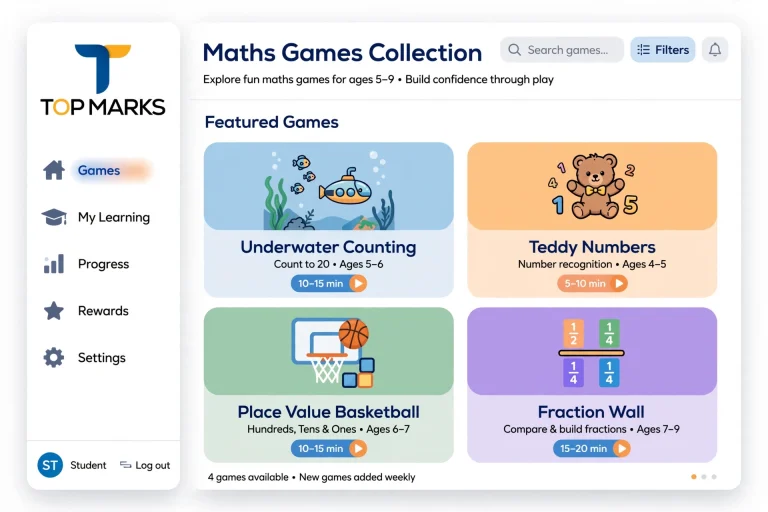
| Underwater Counting | Early counting and number recognition |
| Teddy Numbers | Recognising numbers and counting |
| Coconut Multiples | Identifying multiples |
| Mental Maths Train | Arithmetic practice |
| Place Value Basketball | Understanding place value |
| Fraction Wall | Comparing and understanding fractions |
| Number Bonds | Learning number pairs |
| Shape Sorters | Recognising and classifying shapes |
| Symmetry activities | Understanding symmetrical patterns |
The most effective approach is to select a game based on the skill a child needs to improve. A popular activity is not automatically the right activity for every learner.
Topmarks Games for Kids by Age Group
Not every maths activity is suitable for every age. Younger children need opportunities to recognise numbers and understand quantities, while older pupils benefit from challenges involving multiplication, fractions and problem-solving.
The following age-based suggestions can help parents and teachers choose suitable activities.
Early Years and Reception
At this stage, the main objective is to build number awareness and confidence with basic counting.
Suitable activities include:
A teacher can display a counting activity and ask children to identify the number of objects before counting them individually. This introduces subitising, which means recognising small quantities without counting every item.
Short sessions of around 5–10 minutes can be useful when combined with practical activities.
Key Stage 1: Years 1 and 2
Children in Years 1 and 2 begin developing stronger calculation skills. They learn number bonds, basic addition and subtraction, and counting in steps.
Useful Topmark maths games include:
Parents can encourage children to explain their answers instead of simply selecting the correct option. For example, if a child answers 7 + 3 = 10, ask how they knew the answer.
Key Stage 2: Years 3 and 4
At this stage, multiplication tables, division, place value and introductory fractions become increasingly important.
Recommended activities include:
For Year 4 pupils, multiplication practice is particularly useful because children in England take the statutory Multiplication Tables Check.
A short practice session can help pupils improve their recall, but they should also learn how multiplication and division are connected.
Years 5 and 6
Older primary pupils need to apply their existing knowledge to more challenging calculations.
Useful activities include:
Teachers should combine these games with written questions and explanations. This helps children transfer their knowledge from the screen to ordinary mathematical problems.
Topmarks Beyond Mathematics: English, Phonics and Other Subjects
Although Topmark maths is a major attraction, the website also offers educational activities in other curriculum areas.
This makes it useful for families and teachers who want to explore different subjects without switching between several learning platforms.
English and Phonics Activities
Early reading requires children to recognise letters, understand sounds and develop confidence with words.
The website includes activities relating to:
Some activities include interactive exercises that allow children to practise identifying sounds and spelling patterns.
For younger pupils, teachers can introduce a sound during a lesson and then select a related activity for additional practice.
Science and Topic-Based Learning
It also provides access to science, geography and history activities, although its maths and English resources are more extensive.
These additional resources can support classroom discussions and introduce children to subjects beyond basic calculations.
Computing and Geography
Some activities introduce children to simple sequencing and computational thinking.
Geography-related resources can also support learning about directions and map skills.
These activities are best used alongside teacher explanations, practical examples and classroom discussions.
How to Use Topmarks Effectively at Home and School
Simply opening an educational game does not guarantee that a child will learn something useful. The activity should have a clear objective, and children should understand what they are practising.
A structured approach can make the experience more productive.
For Teachers: A Three-Part Lesson
Teachers can include it within an ordinary lesson without allowing the game to take over the teaching process.
| Lesson stage | Suggested activity | Purpose |
|---|---|---|
| Direct teaching | Explain a topic using examples or physical resources | Introduce the concept |
| Guided practice | Play a suitable Topmark game together | Reinforce the skill |
| Independent practice | Complete written questions or another activity | Check understanding |
For example, when teaching equivalent fractions, a teacher can first demonstrate how one-half and two-quarters represent the same amount.
Pupils can then use a fraction-related game to reinforce the idea. Finally, they can answer written questions and explain why the fractions are equivalent.
For Parents: Supporting Learning at Home
Parents do not need to be mathematics experts to help children use educational games.
A few straightforward habits can make home practice more useful:
For example, after a multiplication activity, ask your child to explain how they worked out 6 × 7. They might recall the answer directly or use another multiplication fact to calculate it.
Both approaches provide an opportunity to discuss mathematical thinking.
Five-Minute Maths Practice Routine
Short, focused sessions can be easier to fit into a busy school day.
Try this simple structure:
This method works particularly well for number bonds, multiplication tables and mental arithmetic.
Using Topmarks on Interactive Whiteboards, Tablets and Computers
The website can be used in different learning environments, including classrooms and homes. However, teachers should check that their chosen activity works properly on the available equipment.
Interactive Whiteboards
An interactive whiteboard is useful when a teacher wants the whole class to participate.
A typical setup involves:
Teachers can ask children to predict an answer before selecting it on the board. This encourages everyone to think rather than allowing only the pupil using the screen to participate.
Tablets and Mobile Devices
Children can access browser-based learning activities on suitable tablets and mobile devices.
For a better experience:
A tablet can be particularly useful for paired learning, where two children discuss questions and take turns answering.
Desktop and Chromebook Access
Computers and Chromebooks are useful for independent practice and school computer rooms.
Teachers can bookmark frequently used pages so pupils do not have to search for the same activities every time.
Before assigning independent work, demonstrate the game and explain what pupils should do when they finish.
Advantages and Limitations of Topmarks
Top marks has several practical strengths, but it is worth understanding its limitations before making it a regular part of a child’s learning routine.
| Advantages | Limitations |
|---|---|
| Free website games | Advertisements may appear |
| No conventional login for website games | Requires internet access |
| Useful primary maths activities | No centralised school-wide progress dashboard |
| Supports classroom and home practice | Subject coverage varies |
| Immediate feedback in interactive activities | Some external resources may differ in quality |
| Suitable for short learning sessions | Does not replace structured teaching |
Is Topmarks a Complete Learning Programme?
No. It is better understood as a collection of supplementary learning resources.
It offers activities for practising skills, but teachers still need to explain concepts, assess understanding and provide additional support where necessary.
For example, a child might achieve a good score in a multiplication game but struggle to solve a written multiplication problem. This is why teachers should combine digital activities with practical examples and written work.
Topmarks vs Other Educational Platforms
Different educational websites serve different purposes. It is particularly useful for free interactive practice, while other platforms may provide more structured lessons or detailed explanations.
| Platform | Cost | Main strength | Best suited for |
|---|---|---|---|
| Topmarks | Free website resources | Interactive games | Primary learning practice |
| Mathsframe | Free resources and paid options | Topic-based maths activities | Structured maths practice |
| BBC Bitesize | Free | Explanations, videos and quizzes | Learning and revision |
| Purple Mash | Paid school licences | Creative and curriculum activities | Structured school learning |
| PhET | Free | Interactive simulations | Exploring science and maths concepts |
The right choice depends on the learning objective.
If you want free activities for practising number facts, Topmark is a useful starting point. If a child needs a detailed explanation of a difficult concept, a teaching resource with videos or guided examples may be more appropriate.
Using more than one platform can provide a balanced learning experience.
Making Topmarks More Inclusive for Different Learners
Children do not all learn at the same speed or respond to digital activities in the same way. A game that works well for one pupil might be distracting or stressful for another.
Teachers and parents should consider the following points.
Avoid unnecessary time pressure: Timed games can motivate some children, but others may need untimed practice to develop accuracy and confidence.
Check sound and animations: Loud sounds, flashing effects and busy screens can distract some learners. Preview activities and adjust sound settings where possible.
Give clear instructions: Explain the activity before children start, particularly when introducing a new game.
Offer alternative practice: A child who struggles with a digital activity may benefit from physical counters, number lines or written examples.
Observe individual progress: Focus on accuracy, understanding and confidence rather than comparing children solely through scores.
These adjustments help make digital learning more comfortable and purposeful for different learners.
Common Problems When Using Topmarks
Most website activities are straightforward to access, but technical problems can occasionally interrupt a learning session.
Here are some basic checks.
The Game Is Not Loading
Try the following:
If the problem continues, the particular activity may have a technical issue.
The Sound Is Not Working
Check the device volume and browser audio settings. Also make sure headphones or external speakers are connected correctly.
The Interactive Whiteboard Is Not Responding
Check the screen calibration and connection between the computer and display. Test another activity to determine whether the issue affects one game or the entire system.
The Activity Is Running Slowly
Close unnecessary applications, check the internet connection and reload the activity.
Older devices may also struggle with some interactive content, so testing the game before a lesson is sensible.
Does Topmarks Have an App? Understanding Website and Paid App Access
Many parents search for a Topmarks app because they want children to access educational games more conveniently on tablets and other devices.
It is important to distinguish between the free website and separately available applications.
The free Topmark website provides browser-based activities. Children can open suitable games through a web browser without installing a conventional application.
The separate Hit the Button app is a paid product. According to the supplied product information, it offers offline access after downloading and optional results tracking for up to 30 learner profiles.
| Feature | Free Topmarks Website | Hit the Button App |
|---|---|---|
| Access | Web browser | Installed application |
| Cost | Free website resources | Paid app |
| Internet | Required for website access | Can work offline after download |
| Practice | Multiple educational subjects | Focused number-fact practice |
| Progress records | No centralised school dashboard | Optional results tracking |
Before purchasing an application, check its current availability, compatibility and price through the relevant official app store.
Can Teachers Monitor Children’s Progress?
Topmark is useful for practice, but its free website should not be treated as a complete student progress management system.
Teachers generally need to monitor learning through their own assessment methods.
For example, after a Daily 10 activity, pupils can write their results in a maths journal. Teachers can also ask them to explain difficult questions or complete a short written exercise.
These methods help identify whether a child understands the topic or simply remembers answers from repeated gameplay.
A useful assessment routine includes:
The objective is to understand learning progress, not simply collect high scores.
Frequently Asked Questions
Final Thoughts
Topmarks remains a useful educational resource for parents and primary school teachers who want accessible learning activities without a website subscription.
Its collection includes mathematics, literacy, phonics and other subject-based resources. Popular choices such as Hit the Button and Daily 10 make it particularly useful for practising mental arithmetic, while money, counting, fractions and place value activities provide additional learning opportunities.
The most effective way to use it is to connect each game with a clear learning objective. Let children practise, review their mistakes and explain their answers. Combining interactive activities with written exercises and practical examples creates a more balanced learning experience.
For families looking for free maths games for kids and teachers planning short classroom activities, it is certainly worth exploring.
Read more