
Seneca Learning is an online learning platform designed to help students revise school subjects, practise exam questions and improve their understanding through interactive study materials. It is also used by teachers to organise homework, check class performance and identify areas where pupils need extra support. Parents can use the platform to keep track of their child’s learning progress.
Whether you’re a student preparing for GCSEs, an A-Level learner, a teacher managing classroom assignments or a parent checking schoolwork, Seneca brings several learning activities together in one place. Its free courses provide access to a large collection of exam-board-specific content, while Seneca Premium adds further study tools, courses and school reporting features.
This guide explains how Seneca Learning works, how to access your account, what students and teachers can do with it, and the differences between its free and Premium services.
What Is Seneca Learning and Who Can Use It?
Seneca Learning is an online homework, revision and distance-learning platform for schools and individual learners. Its resources help students study independently, while teachers can use the platform to assign work and review performance.
The platform supports three main types of users:
| User | What they can do |
|---|---|
| Students | Access courses, revise subjects, answer questions and monitor their learning. |
| Teachers | Create assignments, check results and follow students’ progress. |
| Parents | View their child’s learning activity and academic progress. |
Each account serves a different purpose, so choosing the correct account type is important when accessing the platform.
For students, Seneca can be useful for regular revision and exam preparation. Teachers can use it to organise homework without having to manage every task separately, while parents gain a clearer picture of how their children are getting on.
How to Access Seneca Learning Login
If you already have an account, you can use the Seneca Learning login option to return to your courses, assignments or teaching dashboard.
The general account access process is straightforward:
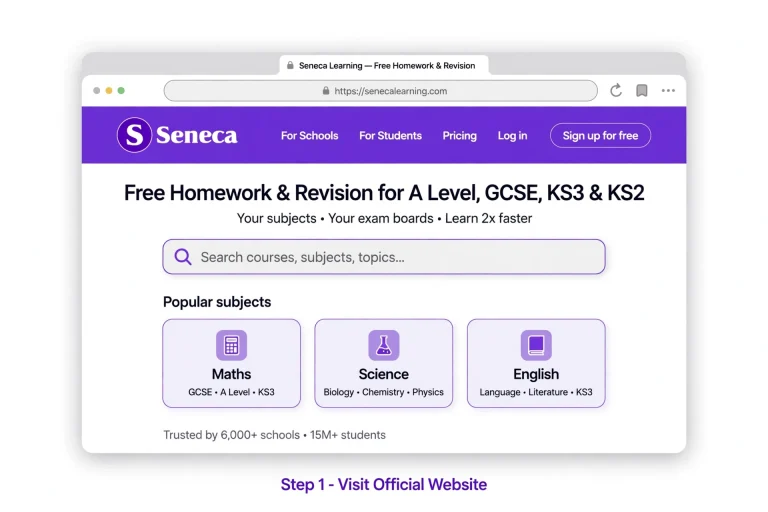
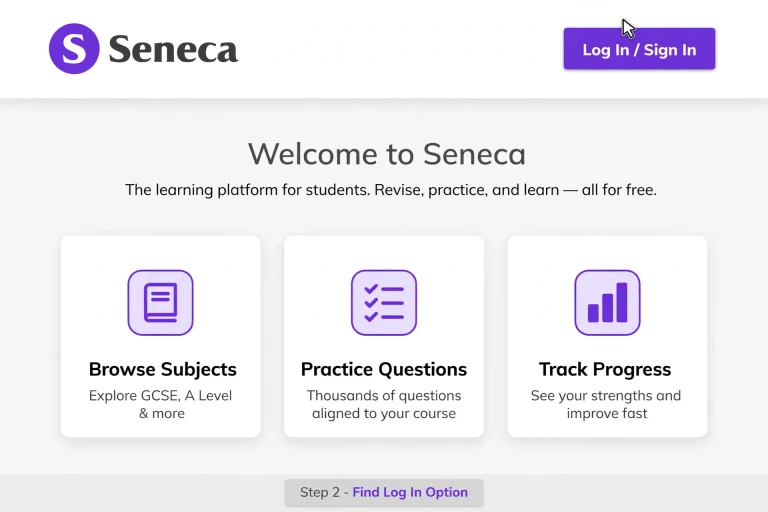
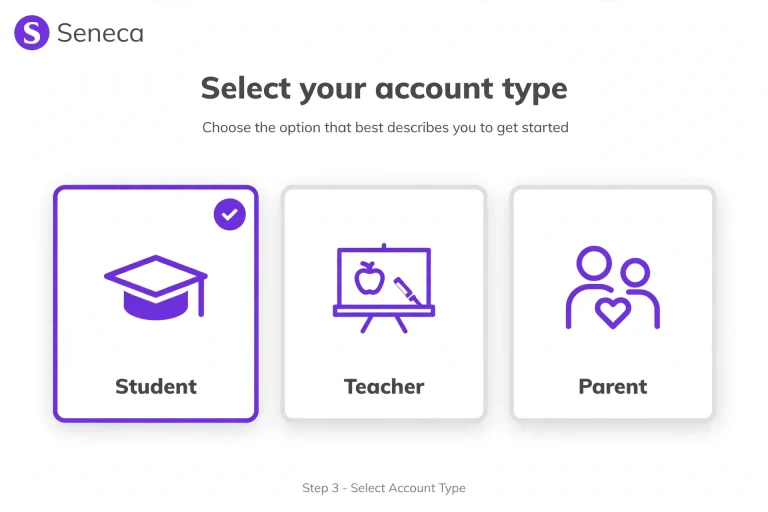
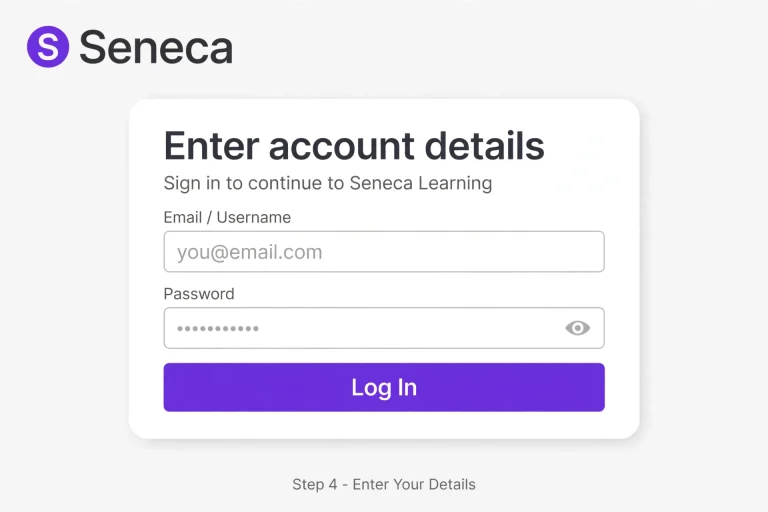
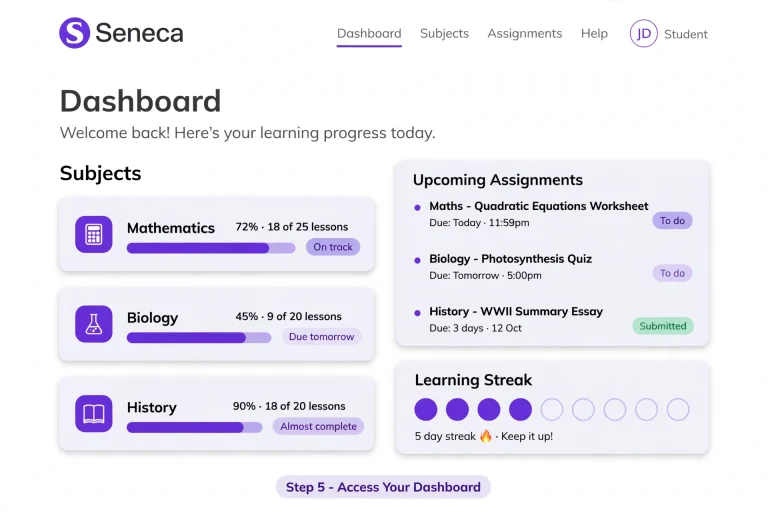
For students: Once signed in, look for your assigned subjects, revision materials and any homework set by your teachers.
For teachers: Your account provides access to assignment creation, class information and student performance reports.
For parents: Use the parent account to view the learning activity and progress shared through your child’s school arrangements.
What If You Cannot Log In?
If your Seneca Learning login isn’t working, check a few common issues before trying again:
If your school manages your access, contact the relevant teacher or school administrator for assistance.
What Can Students Learn on Seneca?
One of the main reasons students use Seneca Learning is its collection of interactive courses. Rather than relying entirely on reading notes, learners can work through questions and study activities that help them practise what they’ve covered in class.
The platform provides more than 600 free courses covering different exam boards. These resources are designed to support individual learning and help students focus on their academic needs.
Students can use Seneca for:
The platform also adapts learning activities to individual students, helping them follow a learning path suited to their needs.
Seneca Learning for GCSE and A-Level Students
Students preparing for GCSE and A-Level examinations can use the available courses to revisit subject knowledge and practise relevant questions.
Instead of trying to revise every topic at once, learners can work through individual subjects and identify areas that need more attention.
For example, a student struggling with a particular science topic can revisit the relevant course and practise questions to improve their understanding.
Teachers can also assign courses as homework, making it easier for pupils to continue learning outside classroom lessons.
Is Seneca Learning Free?
Yes. Seneca provides a substantial free learning package for students and teachers.
The free version includes access to more than 600 exam-board-specific courses. Students can use these resources for revision and independent study, while teachers can create assignments and monitor student performance.
The free teacher account also supports several useful classroom activities, including:
Seneca’s free tier is designed to make learning resources accessible to schools and students regardless of their budgets.
However, some additional learning tools and courses are available through Premium packages.
Free Seneca vs Seneca Premium
The main difference is the additional learning content, revision tools and reporting facilities included with Premium.
| Feature | Free access | Premium |
|---|---|---|
| Free exam-board courses | Yes | Yes |
| Standard assignments | Yes | Yes |
| Student progress monitoring | Yes | Yes |
| Smart Learning Mode | Premium feature | Included |
| Wrong Answer Mode | Premium feature | Included |
| Cram Mode | 20 questions at a time | Unlimited questions |
| Premium courses | Not included | 800+ courses |
| Exam-style predicted papers | Not included in free package | Included in Premium content |
| AI-marked exam question assignments | Premium school feature | Available |
| Whole-school reports | Not included in the same Premium package | Included |
The precise features available depend on the type of account and Premium package.
What Does Seneca Premium Offer?
Seneca Premium adds extra resources for students and more advanced tools for schools. Its purpose is to give learners additional ways to practise, revise and understand difficult subjects.
For schools that have already subscribed, Premium can provide additional support for both classroom teaching and independent revision.
1. Smart Learning Mode
Smart Learning Mode recommends which topics students should study next.
It uses Seneca’s learning algorithm, insights from cognitive neuroscience and AI to suggest suitable study activities. The aim is to help students spend more time on topics where additional practice could make a difference.
This can be useful when a learner isn’t sure which subject or topic to revise next.
2. Wrong Answer Mode
Students don’t always need to repeat questions they already understand. Sometimes, the best use of revision time is to concentrate on mistakes.
Wrong Answer Mode addresses this by showing learners questions they have answered incorrectly before.
It gives students another opportunity to work on weaker areas and strengthen their understanding through targeted practice.
3. Cram Mode
Cram Mode allows students to answer quick questions from several topics.
It can be particularly useful before an examination because students can use it to identify subjects they haven’t fully understood.
There is a difference between the free and Premium versions:
This makes the Premium option useful for students who want to carry out longer revision sessions.
Exploring the Seneca Premium Course Library
Premium subscribers receive access to more than 800 additional courses. These include resources designed for different learning needs, from examination practice to memory development.
Some of the available Premium content includes:
| Premium resource | How it helps |
|---|---|
| Exam-Style Predicted Papers | Provides exam-style practice based on previous exam trends. |
| HyperLearning Courses | Offers additional learning content and questions. |
| HyperFlashcards | Allows students to test their knowledge using flashcards. |
| Premium Knowledge Questions | Provides extra opportunities to develop subject knowledge. |
| Hardest Questions | Challenges students who want to aim for higher grades. |
| 4–5 Booster Courses | Offers additional revision support. |
| The Night Before | Provides cramming-focused revision content. |
| Applying to Uni | Supports students exploring university applications. |
| Driving Theory | Offers additional learning content for driving theory. |
| Memory Techniques | Introduces methods to help students remember information. |
Students can work through these resources independently, or teachers can assign relevant Premium courses as homework.
The additional content gives learners more options when preparing for exams or looking for ways to improve their understanding.
How Schools Benefit from Seneca Premium
Seneca Premium isn’t only designed to improve the student learning experience. It also gives schools additional tools for managing assignments, checking performance and understanding how pupils use the platform.
Three features are particularly useful for teachers and school administrators.
MIS Integration for Easier School Management
Managing student lists and classroom information can take time, particularly when teachers work across different digital systems.
Seneca’s Management Information System (MIS) integrations help reduce this administrative work.
The platform can connect with school systems such as:
Once connected, Seneca can import up-to-date class lists and associate students with the correct classes.
Changes made to school class lists are reflected when the system completes its overnight synchronisation.
This means teachers don’t have to spend as much time manually organising pupils and classroom groups.
It can also make getting started easier for staff members who aren’t particularly confident using technology.
Exam-Question-Only Assignments
Premium teachers can create assignments containing exam-style questions, including thousands of free-text questions marked using AI.
These questions are written by examiners and teachers, giving pupils opportunities to practise answering questions in an examination-style format.
Teachers can use these assignments to:
Premium teachers can also create unlimited standard Seneca assignments with three exam questions attached, rather than being limited to three concurrent assignments.
Whole-School Progress Reports
Understanding how students perform across different classes and subjects can help schools make better decisions about teaching and revision.
Seneca Premium provides whole-school reports that allow authorised staff to review learning activity across the school.
These reports can include information about:
This level of reporting helps schools identify patterns in student engagement and recognise where additional learning support may be needed.
In-App Reports for Teachers
Teachers can also access dynamic reports directly through their accounts.
These reports provide an overview of student, teacher and parent activity. Available filters allow staff to narrow the information down to particular year groups or departments.
For example, a teacher who wants to review one department’s activity can use the available filters rather than manually checking every class.
How Teachers Can Get the Most from Seneca Premium
Having access to Premium features is only part of the process. Teachers also need to use the available tools regularly so students become familiar with the platform.
Here are some practical ways to make better use of the service.
Set assignments regularly
Give students consistent opportunities to work through Seneca courses. Regular assignments can help learners develop a revision routine and become comfortable using the platform.
Knowledge Gaps assignments are also worth considering because they provide more targeted learning opportunities.
Check student performance
Use the Grades tab, Report Cards and available reports to review assignment results.
Regularly checking this information can help teachers recognise students who may be struggling with particular topics.
Connect parents with student accounts
Parents can play an important role in supporting their children’s education. Invite them to connect with their child’s progress so they can see learning activity and understand how schoolwork is progressing.
Teachers can also send individual report cards to parents.
Use AI-marked exam assignments
Exam-style assignments provide useful practice before examination season. Teachers can use the results to see where students need further support and identify pupils who are ready for more challenging questions.
Create Magic Quizzes
Teachers can use their own learning resources to create Magic Quizzes. This provides another way to turn existing teaching materials into student activities.
Encourage friendly competition
Class and school leaderboards can help make learning more engaging.
Healthy competition between classmates and other schools in the area can encourage students to participate more regularly.
Seneca Learning App: What Should Students Know?
Many learners search for the Seneca Learning app because they want to access revision materials without having to navigate a computer every time.
Before downloading anything, check the official Seneca website or its verified app-store listings for current app availability and supported devices.
The supplied school guidance confirms Seneca’s online learning services, but it doesn’t provide detailed app download instructions or confirm specific mobile app features.
Students should therefore use official sources when checking whether an app is available and which features it supports.
Seneca Learning Pricing: Is Premium Worth It?
Seneca offers free learning resources alongside additional Premium packages for students and schools.
The free version already includes more than 600 courses and useful assignment tools. This makes it a practical starting point for students who want revision materials without paying for an upgraded account.
Premium may be worth considering when students need additional courses, Smart Learning Mode, Wrong Answer Mode or unlimited Cram Mode questions.
For schools, the additional reporting, MIS integration and AI-marked examination assignments may be useful for managing teaching activities across larger groups.
What about the exact cost?
The source information does not provide current subscription prices or a complete pricing breakdown. Schools and individuals should check Seneca’s official pricing information before making a purchase.
Seneca Learning Reviews: What Should You Consider?
When looking at Seneca Learning reviews, it helps to consider what you actually need from an online study platform.
A student preparing for GCSE examinations may value revision courses and practice questions, while a teacher may be more interested in assignment management and progress reports.
Here are some points worth considering:
Potential advantages
Things to check before choosing a package
The best way to decide is to explore the free resources first and compare them with the features you would actually use.
What Does ‘Seneca – Learn 2x Faster’ Mean?
Seneca uses the phrase ‘Learn 2x Faster’ to describe its learning approach.
The idea behind the platform is to make revision more focused through interactive questions, personalised recommendations and learning activities that encourage students to revisit topics.
Features such as Smart Learning Mode and Wrong Answer Mode are designed to help learners concentrate on areas that need more attention.
However, the phrase should not be treated as a guaranteed result for every student. Individual progress depends on factors such as study habits, subject knowledge, consistency and the time spent practising.
Using Seneca regularly can support revision, but it should work alongside classroom teaching, independent study and other examination preparation.
Frequently Asked Questions
Final Thoughts
Seneca Learning offers students, teachers and parents a shared platform for supporting education outside the traditional classroom. Its free courses provide a useful starting point for revision, while teachers can organise homework and monitor student performance.
Premium adds more specialised learning features, extra courses and reporting tools for schools that need additional support. Students can benefit from targeted revision activities, while teachers and administrators can use the available data to understand how pupils are progressing.
If you’re new to Seneca, start with the free courses and explore the tools available in your account. If your school already has Premium, ask your teacher or school administrator which additional features you can access so you can make the most of your account.
Read more