
Paying for school meals, trips, clubs and other school costs does not have to involve cash, paper forms or repeated visits to the school office. ParentPay gives parents and carers a central online place to manage many of these payments, provided their school uses the service.
For first-time users, the most important thing is having the activation details supplied by the school. Once the account has been activated, you can sign in, connect additional children, review payment items and keep track of transactions from the same account.
This guide explains how Parent Pay works, including registration, login, school payments, balances, refunds, password recovery and common payment problems.
What Is ParentPay?
Parent Pay is the UK’s leading online payment system for schools. With ParentPay, parents, guardians, foreign residents, and students can securely pay for school meals, trips, clubs, uniforms, and learning materials without sending cash or cheques into school. Instead of searching for coins every morning, you manage everything from one Parent Pay dashboard on your phone or computer.
ParentPay Registration
Before you start ParentPay registration, you need an Activation Letter from your child’s school. This letter contains a unique Activation Username and Activation Password. Without it, Parent Pay cannot link your account to your child. If you have not received one, contact the school office.
Step 1: Go to the ParentPay Activation Page
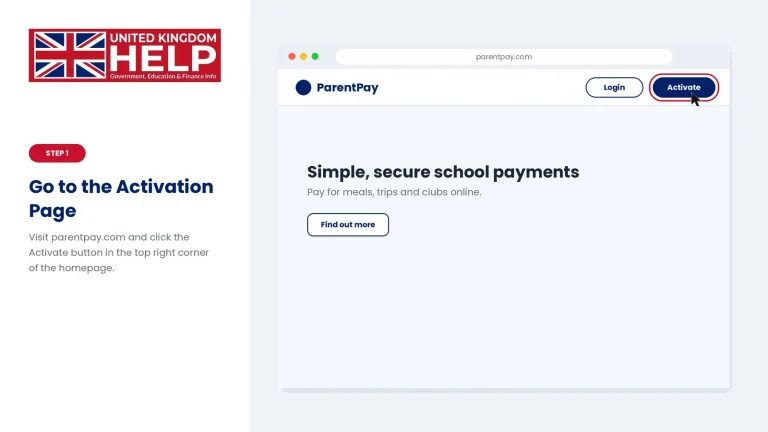
Visit the official site at parentpay.com and click the Activate button in the top right corner of the Parent Pay homepage.
Step 2: Enter Your Activation Details
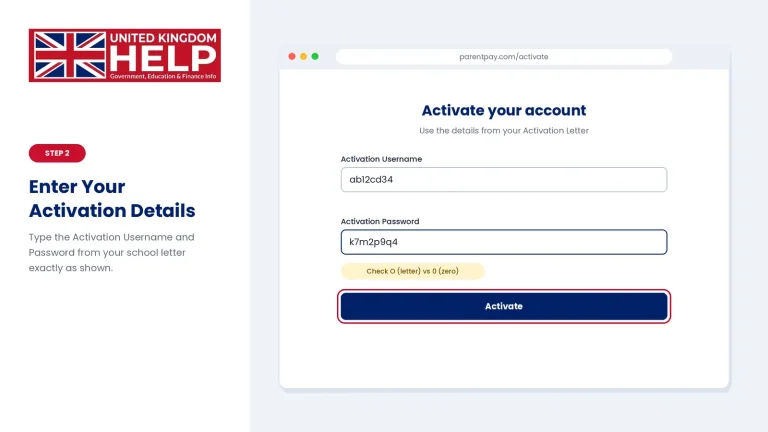
Type the temporary Activation Username and Activation Password from your letter into the Parent Pay activation form. Take care with similar characters, such as the letter O and the number 0. A mistyped code is the most common reason ParentPay registration fails.
Step 3: Set Up Your Profile Credentials
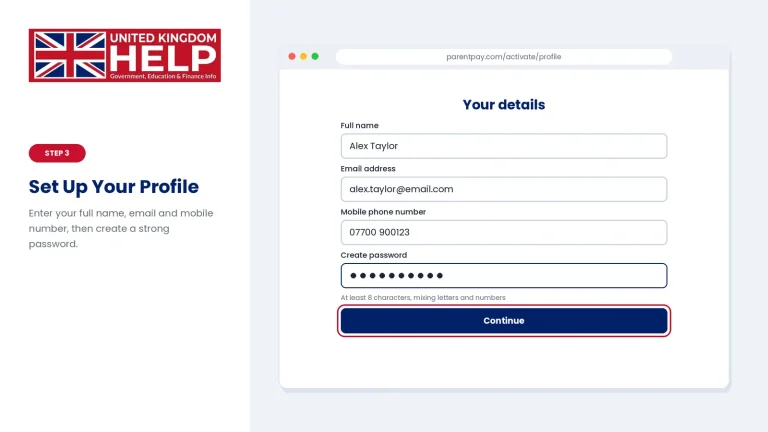
Enter your full name, email address, and mobile phone number. Then create a strong Parent Pay password of at least 8 characters, mixing letters and numbers. Choose a password you do not use on any other site, because your Parent Pay account holds payment access.
Step 4: Verify Your Email Address
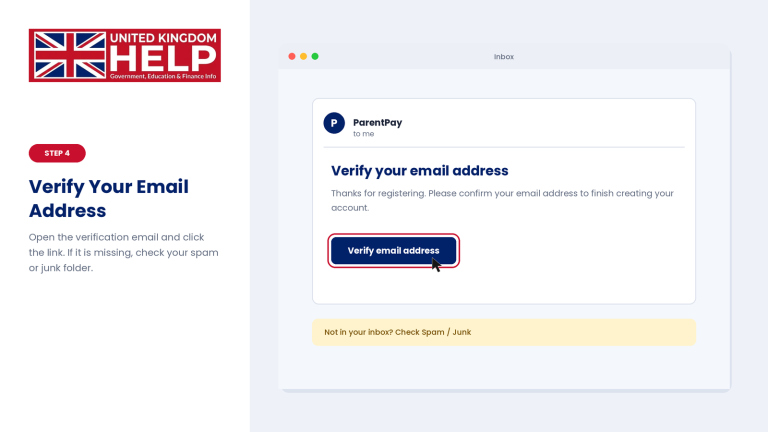
Parent Pay will send a verification email to your inbox. Click the link inside it to confirm your address and finish creating your Parent Pay account. If the email does not appear, check your spam or junk folder.
If Parent Pay says your activation code is invalid, it has probably expired or been mistyped. Ask the school admin for a fresh Activation Letter.
ParentPay Account Setup
Once your account is active, spend a few minutes finishing your Parent Pay profile. A well-configured Parent Pay account means smoother payments and timely notifications.
Adding Multiple Children to Parent Pay
Do you have more than one child using Parent Pay, even at different UK schools? You do not need a second account. Parent Pay lets you link every child to a single login:
You can then pay for several children in one Parent Pay basket, which saves time at checkout.
Setting Up ParentPay Alerts and Notifications
Parent Pay can warn you before a meal balance runs out. To set this up:
These alerts help you avoid missed payments and empty dinner accounts. Many parents say Parent Pay alerts are the feature they value most.
ParentPay Login
After registration, accessing your Parent Pay portal takes less than a minute:
Security note: Parent Pay uses 256-bit SSL encryption. Before entering your details, always check that the browser address starts with
https://www.parentpay.com/and that a padlock icon appears. Never click Parent Pay login links in suspicious emails or texts. Type the address yourself or use the official Parent Pay link above.
Your Parent Pay dashboard then shows every linked child, their balances, and any outstanding payment items.
How to Use ParentPay
Once you log in, the Parent Pay home screen gives you an overview of every child linked to your account. Items are grouped by child and by payment status, so you can see at a glance what is paid and what is still due. The official Parent Pay site is www.parentpay.com, and you can review its data protection information on the Parent Pay security page.
The table below explains the main Parent Pay navigation tabs.
| Parent Pay Tab | What You Can Do |
|---|---|
| Home | See linked children, balance alerts, and direct pay buttons. |
| Payment items | View outstanding balances, upcoming trips, school fees, and optional items. |
| Transaction history | Filter past payments, download receipts, and check refunded items. |
| Meal booking | Choose school lunch menus for specific days. |
| Profile | Update your password, phone numbers, email addresses, and payment methods. |
Spend a minute exploring each tab the first time you log in. Knowing where things live makes every future Parent Pay payment faster.
ParentPay School Payments
Schools list many different items on Parent Pay. Depending on the item, you will either top up a balance or pay a fixed amount. Here are the main types of Parent Pay school payments:
If an item you expect is missing, the school has probably not assigned it to your child yet. Contact the school admin or finance office and ask them to add it to your child’s Parent Pay profile.
ParentPay Payment Guide
Paying through Parent Pay takes only a few steps. Follow this Parent Pay payment guide the first time, and it will soon feel automatic.
Step 1: Select Items to Pay
From the main Parent Pay dashboard, find your child and click Pay for items or Top up.
Step 2: Enter the Payment Amount
For meals, type the top-up amount you want. For trips or installment items, choose whether to pay the full amount or the next scheduled installment.
Step 3: Add to Basket
Click Add to basket. You can repeat this for more items, or for more than one child, and pay for everything in a single Parent Pay checkout.
Step 4: Complete Checkout
Select View basket and pay, then choose your payment method:
Do you have no card? Ask your school for a PayPoint barcode letter. It lets you pay cash at any local shop displaying the PayPoint logo.
Always begin from the official Parent Pay website when you pay, and confirm the padlock icon and the correct address before entering card details.
ParentPay Balance
Parent Pay uses a wallet-style system, so understanding your Parent Pay balance helps you plan payments.
Checking Your ParentPay Balance
Using Your Parent Account Balance
Suppose a trip is cancelled or you overpay. The money returns to your Parent Pay Parent Account Balance. You can then use those funds at checkout to pay for school meals or other items, with no need to pay again from your card. Choose Parent Account Balance as your payment method at checkout.
Timing Tip for Meal Top-Ups
Online meal top-ups usually reach the school’s daily system within 15 to 30 minutes. Even so, topping up the evening before is safer, especially on busy mornings. Set a Parent Pay low-balance alert (covered in Part 1) so you are warned before the money runs out.
ParentPay Password Reset
Forgotten your password or locked out of your account? A Parent Pay password reset takes only a few minutes. Start from the official site, www.parentpay.com, and follow these steps:
Pick a password you have not used elsewhere. Never share it, and ignore any message that asks for your Parent Pay password. Genuine Parent Pay emails will not ask for it. You can read more about account protection on the Parent Pay security page.
ParentPay Refund
A Parent Pay refund depends on whether your money is held in your Parent Account or tied to a school item. The usual flow is simple:
Steps to Withdraw a Parent Pay Refund
Important: Schools make all refund decisions for trips and school meals. Parent Pay customer support cannot issue a refund without the school’s authorisation, so contact the school office first if you think you are owed money.
ParentPay Payment Problems
If a Parent Pay payment goes wrong, check this table before trying again.
|
Problem |
Likely Cause |
|---|---|
|
Card declined |
Bank 3D Secure check failed, or insufficient funds. |
|
Payment pending |
Network timeout during checkout. |
|
Item not visible |
The school has not assigned the item to your child. |
|
Activation code invalid |
The code expired or was mistyped (O instead of 0). |
If none of these fixes the problem, contact your school office first, then use the help section on the official Parent Pay website.
FAQs (Frequently Asks Questions)
Final Thoughts
Parent Pay removes the daily scramble for dinner money and trip cash. Register with your activation letter, set up balance alerts, top up the evening before, and keep your login details private. Always start from the official Parent Pay website and check for the padlock icon before you pay. With those habits, managing school payments through Parent Pay becomes quick and stress-free.