
creliable information about land and property in England and Wales is much easier when you use the official HM Land Registry services. The Land Registry Portal provides professional users with access to HM Land Registry Business e-services, while members of the public can use the GOV.UK property-information service to search for registered property information.
It is important to use the correct service for your purpose. The official portal sign-in page is designed for Business e-services customers, whereas the public search service allows people to find information about property and land even when they are not the owner. This guide covers registration, sign-in, property searches, title registers, title plans, document access, fees and common problems in a straightforward way.Visit our Homepage for more information.
Quick answer: The online service can be used to access property information, search registered land, obtain title registers and title plans, and manage relevant HM Land Registry services. Some professional and business functions are provided through separate business e-services.Visit our Homepage for more information.
What Is the HM Land Registry Portal?
The HM Land Registry Portal is the secure online service used by professional customers to access Business e-services. These services are intended for organisations and professionals who regularly deal with property registration and related applications.
The portal can be used for professional land-registration work, including submitting applications and checking application progress. HM Land Registry also provides services such as View Applications and Application Enquiry for eligible professional users.
For someone who simply wants to check who owns a property, see its title number or obtain a copy of a title register, the public GOV.UK property-information service is usually the more relevant route.
Portal vs Public Property Search
| Service | Main user | Typical purpose |
|---|---|---|
| HM Land Registry Portal | Business and professional users | Business e-services and land-registration applications |
| GOV.UK property search | General public and property users | Finding property information and purchasing online copies |
| Index Map search | People unable to locate a property in the register | Finding a title number or checking whether land is registered |
HM Land Registry covers registered property and land in England and Wales. Scotland and Northern Ireland have separate land-registration systems.
Before You Try the Land Registry Portal Login
The first thing to establish is which type of access you actually need.
If you are a solicitor, conveyancer, lender, property professional or another organisation using HM Land Registry Business e-services, you may need a Business e-services account. New portal users must apply for access before they can use the professional service.
If you only want to look up a house, flat or parcel of land, you generally do not need professional portal access. Instead, use the official GOV.UK property search service.
What You May Need
For professional access, HM Land Registry provides organisations with account and security information. A Business Unit Administrator can receive administrator login details and a security token used during account administration and sign-in.
For a public property search, you normally need enough information to identify the property, such as:
The public service requires sign-in, and users without existing sign-in details can create them.
How to Register for HM Land Registry Business e-Services
Professional users should start through the official GOV.UK route rather than relying on third-party websites advertising land-registration services.
Registration process
1. Check that you need Business e-services

2. Apply for access

3. Receive your account details
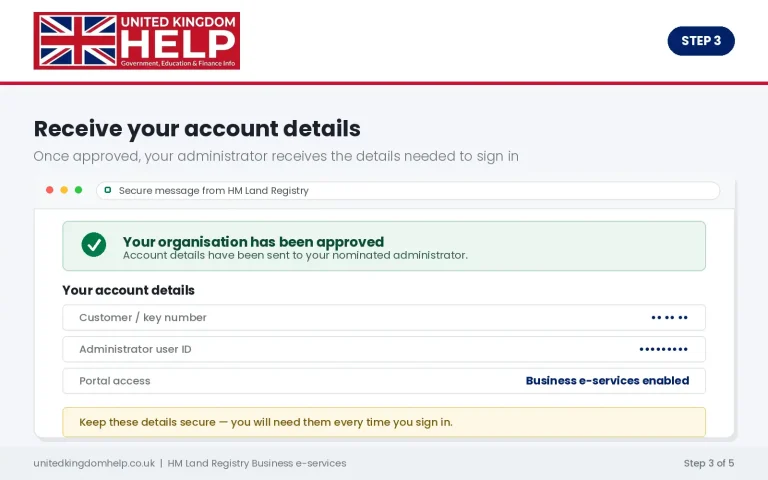
4. Set up your security details

5. Sign in through the official portal

Land Registry Login Portal: Step-by-Step
The current official sign-in page identifies itself as the HM Land Registry portal and warns users that cookies must be accepted to maintain the login session. It also provides an option for users who have forgotten their user ID or password.
Login
1. Open the official portal

2. Check the web address

3. Enter your user ID
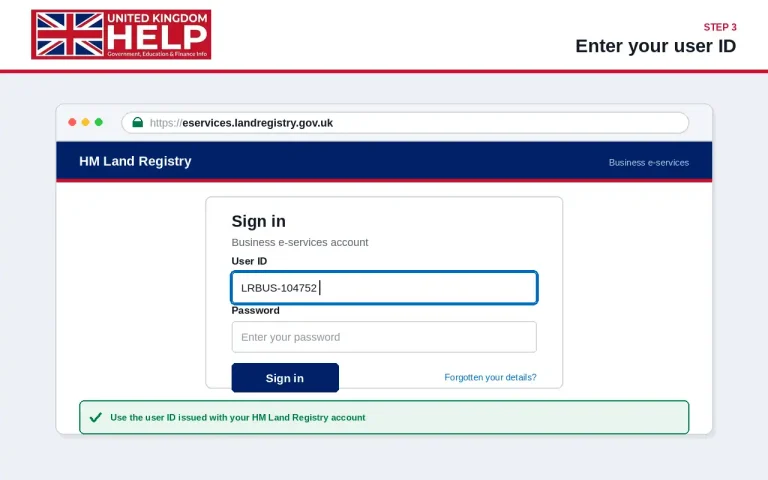
4. Enter your password

5. Complete the security check

6. Continue to your account

If You Have Forgotten Your Login Details
The official sign-in page includes a “I have forgotten my user ID or password” option. Use that facility rather than attempting repeated guesses or using an unofficial password-recovery website.
If your organisation manages the account centrally, your Business Unit Administrator may also be able to help with user-account administration.
Important: The Online Property Search Is Different
A common source of confusion is searching for a land registry online portal when the actual requirement is simply to obtain property information.
The public GOV.UK service lets you search registered property and land in England and Wales. It can provide a property summary, title register and title plan, subject to the applicable service and fees.
The property summary is free. Online copies of a title register or title plan currently cost £7 each, while official copies are £11 per document and are supplied through the official-copy process rather than as an online downloadable copy.
This distinction matters because entering the professional portal is not necessary simply to find basic information about a house or parcel of registered land.
Quick Guide: Which Service Should You Use?
Need to manage professional applications?
Use the HM Land Registry Business e-services portal.
Need to find who owns a property?
Use the GOV.UK property search service.
Need a title register?
Search the property and purchase the online copy where available.
Need a title plan?
Use the public property-information service to obtain the online copy.
Need evidence suitable for proving ownership?
Request an official copy rather than relying on an ordinary online copy.
How to Use the Land Registry Online Portal
Once you know which service you need, the process is relatively straightforward. The important point is to use the correct HM Land Registry service for your situation.
The professional land registry online portal is primarily designed for business customers and organisations that regularly deal with property transactions. Public users who simply want information about a property should normally use the GOV.UK property information service instead.
Land Registry Portal Login: Step-by-Step
For authorised business users, the current sign-in route is the official HM Land Registry e-services page:
Follow these steps:
1. Open the official sign-in page
2. Choose the sign-in option
3. Enter your login details
4. Complete security checks
5. Recover forgotten details
6. Check your browser settings
Who Can Use the HM Land Registry Portal?

A common source of confusion is assuming that the professional portal is simply another version of the public property-search service.
The HM Land Registry portal is intended for professional and business customers. Organisations can use it for activities such as submitting applications, accessing register information, ordering official copies, making searches and checking application progress.
Business customers can also use Business Gateway, which is designed to integrate HM Land Registry data and services with business systems. The choice between the portal and Business Gateway depends on how an organisation works and how frequently it needs to transact with HM Land Registry.
If you are an individual homeowner, buyer, seller or someone researching a property, you generally do not need a professional business account simply to look up property information.
Understanding a Property Title Register
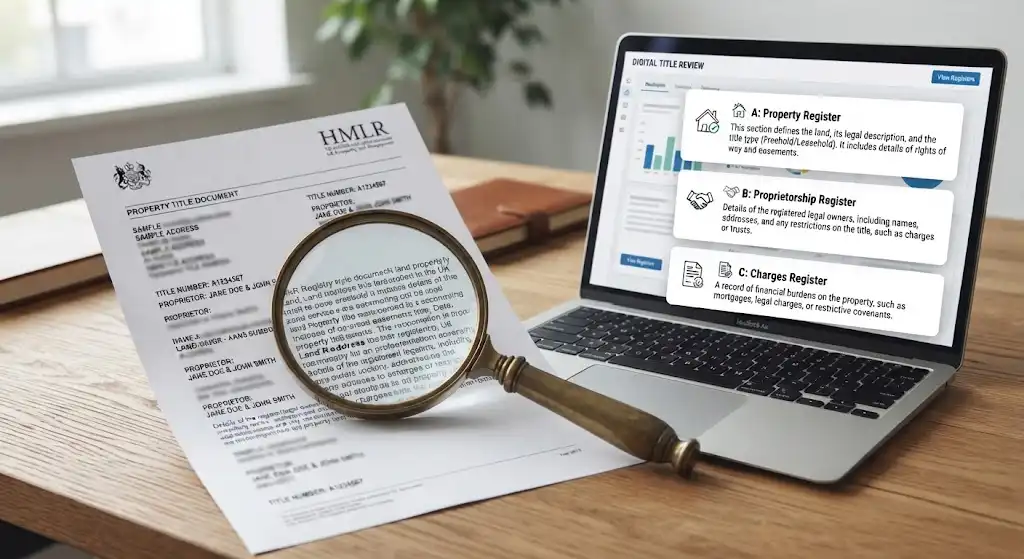
If you are using the public search service, one of the most useful documents is the title register. It provides important information about a registered property or piece of land.
The register is generally divided into three main parts.
A. Property Register
The Property Register describes the property and the land included in the title.
It can show:
The title plan complements this information by showing the general extent and location of the registered property. HM Land Registry explains that the boundaries shown on a title plan are general boundaries, rather than necessarily defining the exact legal boundary.
B. Proprietorship Register
The Proprietorship Register contains information about ownership.
Depending on the title, it may show:
A purchase price may also appear where HM Land Registry has that information available.
C. Charges Register
The Charges Register records certain financial charges and other burdens affecting the property.
This can include information about:
Reading this section can therefore be important when researching a property before a transaction.
Ordering Property Documents Online
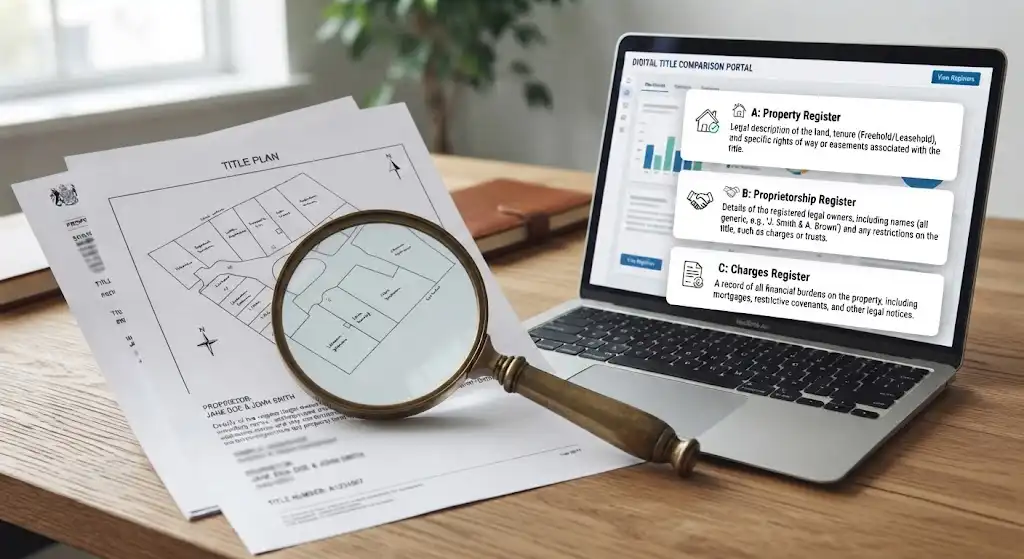
The public property information service allows users to search for properties in England and Wales. You can search even if you are not the owner.
After locating a property, you can normally purchase copies of relevant documents through the official service.
Current GOV.UK guidance lists:
Official copies are different from ordinary online copies. GOV.UK states that official copies cannot be downloaded online, so do not assume that purchasing an online copy gives you the same document for formal proof purposes.
This distinction matters when a solicitor, lender or another organisation specifically asks for an official copy rather than an informational copy.
What If the Property Cannot Be Found?

Sometimes a normal address search does not produce the expected result. This does not automatically mean that the land is unregistered.
HM Land Registry provides an index map search for situations where you need to establish whether land or property is registered. Current guidance lists a fee of £8 for a search covering up to five registered titles, with additional charges for larger searches.
An index map search can be particularly useful when:
Expert tip: Do not assume that a missing result means there is no registered title. Check whether an index map search is appropriate before drawing conclusions.
How to Search for a Property or Land
One of the most useful features connected with HM Land Registry services is the ability to find information about registered property and land in England and Wales. You do not normally need to own the property to search for its basic register information.
However, it is important to understand that the HM Land Registry portal used by professional customers is not the same thing as the public property-information service. Homeowners, buyers and members of the public who simply want to check a property will usually use the public search service rather than applying for a professional Business e-services account.
The official public service is available through GOV.UK:
What You Can Search
The public service can generally be used to search registered property by:
HM Land Registry holds records for most property and land sold in England and Wales since 1993. Scotland and Northern Ireland operate separate land-registration systems, so the same search process does not apply there.
Once you locate the correct property, you can normally view a free property summary before paying for documents.
Property Information You May Find
A property search can help you establish several important details, including:
The exact information available depends on the property’s registration and the document you order.
What Is a Title Plan?
A title plan is different from the title register.
The plan normally shows the registered property or land against an Ordnance Survey map. It can help you understand the property’s general location and the land included within the registered title.
One important point is that title plans generally show general boundaries, rather than acting as a precise survey of every boundary.
This matters when there is a disagreement about the exact position of a fence, wall, hedge or other boundary feature. A title plan should not automatically be treated as a detailed boundary survey.
Title Register vs Title Plan
| Document | Main purpose |
|---|---|
| Title register | Provides legal and ownership information |
| Title plan | Shows the location and general boundaries |
| Official copy | Certified copy that can be used where formal proof is required |
| Filed document | A document referred to in the register and held by HM Land Registry |
How to Order Property Documents Online
If you have found the correct property, the next step depends on what you need the information for.
For ordinary research, an online copy of the title register or title plan may be enough.
Current GOV.UK guidance lists the online price for a title register as £7 and the online price for a title plan as £7. An official copy costs £11 when ordered through the public service.
This distinction is important because an ordinary online copy is not the same as an official copy.
When You Need an Official Copy
An official copy is generally the appropriate option when you need formal evidence, such as proof for a court or another situation where a certified document is required.
GOV.UK explains that ordinary online copies cannot be used as proof of ownership. Official copies are available for situations where formal evidence is required.
Before paying for a document, therefore, consider what you actually need:
Accessing Filed Deeds and Other Documents
Sometimes the title register refers to a document that has been filed with HM Land Registry.
For example, an entry may refer to a transfer, lease, deed or another document. If the register indicates that a document is filed, you may be able to request a copy.
The process is slightly different from simply downloading a title register.
First, obtain and examine the title register. If the register identifies a filed document, you can then follow the GOV.UK process for requesting a copy.
GOV.UK states that the title register costs £7 online and that each official copy of a document costs £11.
This means it is better not to assume that every historical deed is immediately available as a standard download. Availability depends on whether HM Land Registry actually holds the document.
Land Registry Portal Fees: What to Expect
Fees depend on the service you use and the type of search or document you request.
For public property information, the main online document prices currently include:
| Service | Current online price |
|---|---|
| Property summary | Free |
| Title register | £7 |
| Title plan | £7 |
| Official copy of a title document | £11 |
| Official copy of a filed document | £11 |
These prices should be checked against the current GOV.UK guidance before placing an order because HM Land Registry fees and service arrangements can change.
Professional users may encounter a different fee structure when using Business e-services or Business Gateway. HM Land Registry’s published fee guidance sets out separate charges for professional searches, official copies and other services.
Using the Land Registry Online Portal as a Property Professional
For conveyancers, solicitors, lenders and other professional users, the professional portal provides access to services that go beyond a basic public property search.
A registered organisation can use Business e-services for professional transactions and property-related work. Depending on the service and user permissions, professional users can submit applications, conduct searches and monitor applications.
HM Land Registry also provides an Application Enquiry service for professional users. This can help users check the progress of applications and respond to certain matters during the registration process.
This is where terms such as land registry business portal and land registry e portal are often used when people are referring to HM Land Registry’s professional online services.
Why Business Users Need the Professional Service
A professional account is useful where an organisation regularly needs to:
The service is designed for professional customers rather than being a general-purpose account for every member of the public.
Finding a Property When You Do Not Have an Exact Address
Sometimes you know where land is located but do not have a complete postal address.
In that situation, HM Land Registry provides other search options for particular circumstances.
For example, an index map search can be used to establish whether land is registered and identify relevant title information where the exact title is unclear.
GOV.UK explains that an index map search cannot simply be performed by browsing the map yourself. You provide information such as an address or an appropriate plan or Ordnance Survey reference. The published fee is £8 for up to five registered titles.
This can be particularly useful when researching:
Checking Sold Prices and Other Free Information
Not every useful HM Land Registry service requires a paid document.
HM Land Registry also provides free online services that can help people research property information. These include checking whether property is registered, looking up sold prices and viewing house-price trends.
This makes it possible to carry out some initial research before ordering a title register or title plan.
For example, someone researching a potential purchase might first:
This approach can help avoid paying for documents that are not relevant to the property being investigated.
A Simple Property Search Workflow
If your goal is simply to find information about a property, the process can be kept straightforward.
Step 1 — Start with GOV.UK
Use the official government property-information service rather than relying on an advert or an unofficial website.
Step 2 — Search for the property
Enter the available address or location details and identify the correct property.
Step 3 — Check the property summary
Use the free information to make sure you have selected the correct property.
Step 4 — Open the title register
Review the registered title number, ownership information and other relevant entries.
Step 5 — Check the title plan
Use the plan to understand the general location and extent of the registered land.
Step 6 — Decide whether further documents are necessary
If the register refers to a filed document, follow the appropriate process to request it.
Step 7 — Order an official copy if formal evidence is required
Do not rely on an ordinary online copy when you specifically need certified evidence.
Public Search or Professional Portal?
Choosing the correct service can save time.
| Your situation | Appropriate route |
|---|---|
| Checking your own property’s registered details | Public property-information service |
| Researching a property before buying | Public property-information service |
| Checking sold-price information | Public HM Land Registry service |
| Ordering a title register | Public property-information service |
| Ordering a title plan | Public property-information service |
| Professional conveyancing work | Business e-services |
| Submitting registration applications professionally | Business e-services |
| Monitoring professional applications | Business e-services |
The key point is that a land registry login portal for professional customers should not be confused with the public service used to search property records.
Staying Safe When Accessing HM Land Registry Services
Search engines can display adverts or third-party websites that appear to offer HM Land Registry services. HM Land Registry has warned users about websites that can look official while charging more than the government service.
For safer access:
For professional users, the official sign-in page is:
The official login page states that cookies need to be enabled or accepted so that the login session can be maintained. It also directs new users towards obtaining an HM Land Registry Business e-services account and provides an option for users who have forgotten their user ID or password.
Common Problems During Property Searches
Property searches do not always produce the result you expect.
The Property Cannot Be Found
Check the spelling of the address and try alternative search details. Older properties, newly divided plots and land without conventional addresses can require additional investigation.
Several Titles Appear
A single property can sometimes involve more than one registered title. Read the descriptions carefully rather than automatically choosing the first result.
The Boundary Looks Different
Remember that a title plan generally shows general boundaries. It is not necessarily a precise representation of the physical boundary on the ground.
The Register Refers to Another Document
If the register mentions a filed deed, transfer or other document, you may need to request that document separately.
You Need Proof of Ownership
An ordinary downloaded register should not be treated as certified proof. If formal evidence is required, obtain an official copy.
Troubleshooting the Land Registry Portal
Even when you use the correct service, you may occasionally experience problems with registration, login or document searches. The right solution depends on whether you are using the professional portal or the public property-information service.
I Cannot Log In
If you are using the professional service, first confirm that you are using the official HM Land Registry sign-in page.
Check the following:
The official portal login page specifically notes that cookies are required to maintain the login session.
I Am a New Professional User
New organisations need to apply for HM Land Registry Business e-services access before their users can use the professional portal.
The application process is provided through GOV.UK:
HM Land Registry describes Business e-services as a secure service for professional customers. New organisations need to apply for access, with online and postal application routes available.
Do not confuse creating access for a professional organisation with simply searching for a property as a member of the public.
I Have Forgotten My User ID or Password
The official sign-in page provides a route for users who have forgotten their user ID or password.
Start with the official page rather than using an unofficial password-recovery website.
If your organisation controls your access, your administrator may also be able to help determine whether the problem relates to your individual account or your organisation’s Business e-services access.
My Property Search Shows Several Results
This can happen where a property is associated with more than one title or where nearby properties have similar addresses.
Before ordering documents:
Avoid paying for multiple documents until you have established which title relates to the property.
Security Tips for Portal Users
Whether you are a homeowner researching a property or a professional managing applications, use sensible security practices.
Use the Official Route
Begin with GOV.UK or the official HM Land Registry website instead of clicking an unfamiliar advertisement.
HM Land Registry has warned about third-party websites that can appear to provide official services while charging higher fees.
Check the Web Address
Before entering login information, make sure the browser is displaying the legitimate service address.
For professional users, the official portal sign-in page is hosted on the HM Land Registry e-services domain:
Official HM Land Registry Portal login
Protect Your Credentials
Never share your user ID, password or security information with another person simply because they claim to be helping with your account.
If you suspect that your credentials have been compromised, follow your organisation’s security procedure and the official account-support process.
Be Careful With Search Advertisements
A search-engine result appearing above the official government result does not automatically mean it is the government service.
Check the destination before entering payment or account information.
Land Registry Portal Checklist
Use this checklist before starting a search or login.
For Public Property Searches
For Professional Portal Users
Land Registry Portal vs Public Search: Final Comparison
The terminology surrounding HM Land Registry services can be confusing because people often use similar phrases for different services.
| Need | Service to consider |
|---|---|
| Search a house before buying | Public property-information service |
| Check registered ownership | Public property-information service |
| View a title register | Public property-information service |
| View a title plan | Public property-information service |
| Obtain formal evidence | Official copy service |
| Find a filed deed | Deeds/document-copy process |
| Submit professional registration work | Business e-services |
| Manage professional applications | Business e-services |
| Monitor an application | Professional application services |
The important distinction is that the land registry portal login terminology generally relates to accessing an online service, while the exact service you need depends on whether you are a public user researching a property or a professional customer carrying out registration work.
Frequently Asked Questions
Conclusion
The Land Registry Portal is part of HM Land Registry’s online system for professional property-registration services, while the public property-information service provides a separate route for researching registered land and property.
Understanding this difference makes the process much easier. Professional users can apply for Business e-services access and use the appropriate online tools for registration work, while members of the public can search property information without needing professional portal access.
For property research, the title register and title plan provide different types of information. The register focuses on legal and ownership details, while the plan helps show the property’s general location and boundaries. When formal proof is needed, an official copy is the appropriate document rather than a standard online copy.
Before entering login details or making a payment, always verify that you are using the official HM Land Registry or GOV.UK service. Fees, procedures and online services can change, so checking the latest government guidance is sensible before submitting an application or ordering documents.
Read more