
The HMRC VAT Login UK service allows businesses, sole traders and authorised agents across the United Kingdom to access and manage their Value Added Tax (VAT) information online. Through the official HM Revenue & Customs (HMRC) website, users can check VAT return deadlines, review submitted returns, monitor payments, update business details and manage their VAT obligations. Whether you are accessing your account for the first time or returning to complete a regular tax task, using the correct GOV.UK sign-in page helps you reach the right service securely. This guide explains how to access your HMRC VAT account, sign in using Government Gateway, understand GOV.UK One Login, recover forgotten login details and resolve common access problems. It also covers important VAT services, official support options and useful guidance to help UK businesses manage their tax responsibilities with confidence.
What Is HMRC VAT Login?
HMRC VAT login is the secure sign-in route for businesses and individuals who manage Value Added Tax through HM Revenue & Customs (HMRC). The official service is hosted on GOV.UK, so you do not need to search through third-party websites to find the correct page.
Once you reach the VAT online account, you can manage several VAT-related tasks, including checking payment information, reviewing deadlines and updating certain business details. Your access depends on the services connected to your HMRC account and your authorisation.
Quick answer: The official website is Sign in to your VAT online account . Select “Start now” and follow the sign-in instructions. If you have never used HMRC online services, the service will guide you through creating sign-in details.Visit our Homepage for more information.
What can you do after signing in?
Your VAT online account helps you manage several business tax tasks. Depending on the service you use, you can:
Important: The official VAT sign-in page is not the same as the VAT return submission process. HMRC’s service information says you cannot submit a quarterly VAT return through the sign-in page itself.
Who Uses the HMRC VAT Online Account?
This service is intended for people and organisations managing UK VAT obligations. It may be useful if you are:
The account is designed for business tax management, so make sure you select the business VAT service rather than a personal tax service when signing in.
Before You Start Your HMRC VAT Login
Having the right information ready can save time, particularly if this is your first visit or you have more than one HMRC account.
1. Your VAT registration number
You need your VAT number for the VAT service. HMRC issues a 9-digit VAT registration number when a business registers for VAT. Keep it available if you’re connecting or setting up access to the service.
2. Your HMRC sign-in details
HMRC online services can use either Government Gateway credentials or GOV.UK One Login, depending on the service and your existing account.
If you already use HMRC online services, continue with the sign-in details associated with your account. A Government Gateway ID used for one service should not automatically be assumed to be the same as an account created for another service.
3. Access to your verification method
HMRC may ask you to enter an access code. Depending on the available options, this can involve a text message, voice call or authenticator app. Make sure you can access the method connected to your account.
4. A working browser and internet connection
Use a reliable internet connection and an up-to-date browser. If the GOV.UK page is slow, try again later, as HMRC notes that online services can experience delays during busy periods.
HMRC VAT Login vs Other HMRC Login Services
A common mistake is searching for the right HMRC sign-in page but choosing a different tax service. The following comparison helps separate the main account types.
| Search term | What it generally relates to |
|---|---|
| hmrc vat login | VAT online account for business VAT services |
| hmrc login | General HMRC online services |
| hmrc gateway login | Government Gateway sign-in |
| hmrc self assessment login | Personal or business Self Assessment services |
| hmrc paye login | PAYE services for employers |
| hmrc tax login | General tax account access |
| hmrc login self assessment | Self Assessment account access |
HMRC provides a central online services sign-in page for several tax services, including VAT, Self Assessment, PAYE and Corporation Tax. The VAT page is the relevant starting point when your task concerns your VAT account.
How to Prepare for Your First VAT Account Sign In
If you have recently registered for VAT, there are a few things to arrange before using the online service.
New VAT registration
When you register for VAT, HMRC provides a VAT registration number and information about accessing your business tax account. You can then sign in and add the VAT service if it is not already available.
According to the official registration guidance, you can add VAT services by selecting the relevant option in your business tax account and choosing the services you need.
If you use an accountant
An accountant or authorised tax agent can handle VAT returns and other tax tasks on your behalf. However, you should still understand which account you are using and which services are connected to it.
For business owners, this distinction matters because a personal HMRC account and a business tax account may contain different information.
HMRC VAT Login Requirements
Before opening the sign-in page, prepare the details associated with your account. This can save time if you are accessing the service for the first time or switching between personal and business tax services.
You will generally need:
Government Gateway or GOV.UK One Login?
This is an important distinction when searching for an HMRC gateway login. HMRC online services currently support two sign-in routes:
HMRC advises existing users to continue using their established sign-in details. If you have never used HMRC online services, the sign-in process will guide you to create the appropriate details.
Do not assume that a GOV.UK One Login account created for another government service will automatically replace your existing Government Gateway details.
Step-by-Step HMRC VAT Login Instructions
Use the GOV.UK address below. The page includes the Start now button and information about the VAT service.Open GOV.UK VAT account
Step 1: Open the official VAT sign-in page
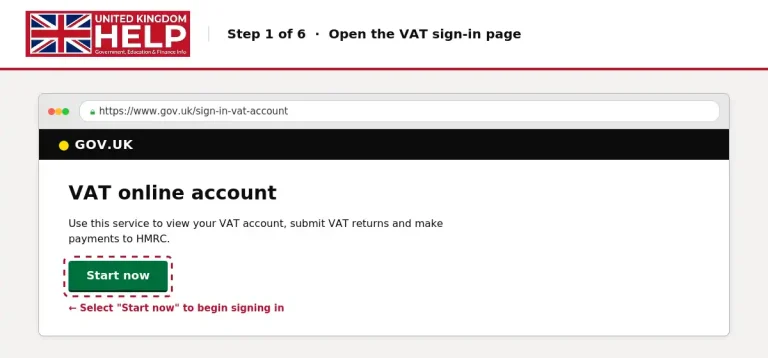
This takes you to the sign-in process for the VAT service.
Step 2: Select the sign-in method
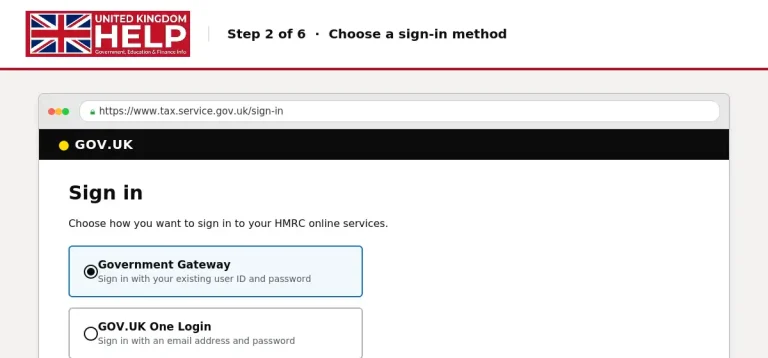
HMRC online services support two sign-in routes:
If you already have HMRC online sign-in details, use those details. Having a GOV.UK One Login for another government service does not necessarily replace your HMRC Government Gateway credentials.
Step 3: Enter your Government Gateway user ID
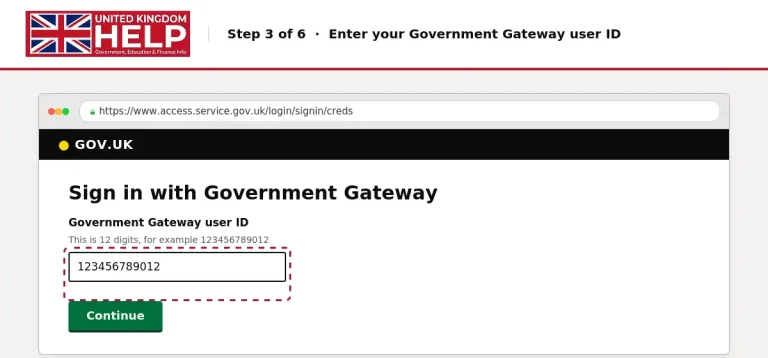
If you choose Government Gateway:
Your Government Gateway ID is the sign-in identifier associated with your online services. If you have several tax-related accounts, be careful not to use the wrong credentials.
Step 4: Enter your password
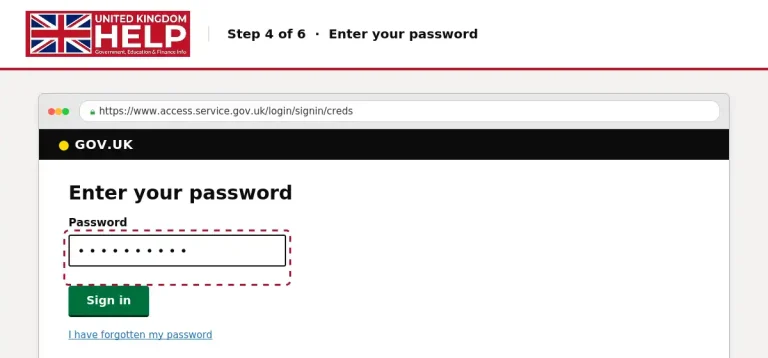
Type the password connected to your account and continue.
If you have forgotten your password, use the recovery instructions provided on the sign-in page. Do not share your password with another person or enter it into an unofficial website.
Step 5: Complete any security verification
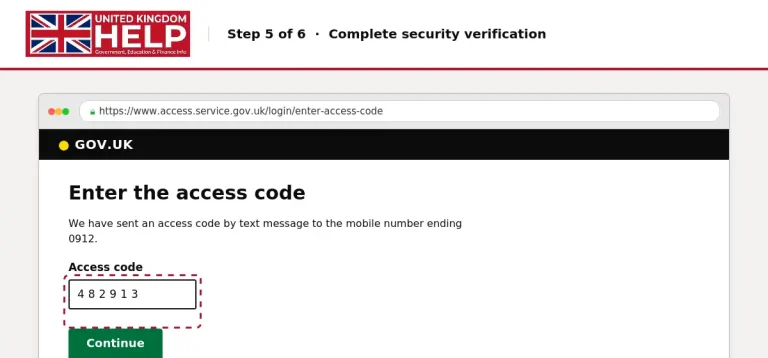
HMRC may ask for an access code as part of the sign-in process. Depending on your account, the code may be sent by:
Enter the code when requested. If you cannot receive it, HMRC’s sign-in help page provides options for getting assistance and changing the way you receive an access code.
Step 6: Open your VAT services
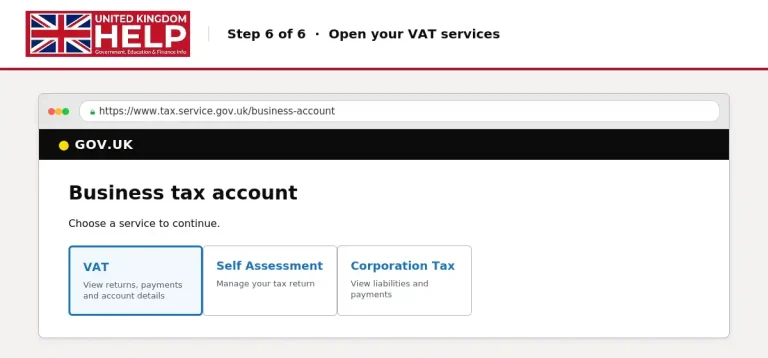
After signing in, look for your VAT account or VAT services. The options available depend on your account and the services connected to it.
If you’re managing VAT for a business, use the business tax account or the VAT online service rather than assuming that a personal tax account contains all your business information.
Official HMRC Links
Keep these government pages handy for different tax-related tasks:
| Purpose | Official website |
|---|---|
| VAT account sign in | HMRC VAT login |
| HMRC online services | HMRC login and account access |
| Register for VAT | Register for VAT |
| VAT general enquiries | HMRC contact information |
These links are official GOV.UK destinations. Use the VAT sign-in page when your main task is accessing your VAT online account.
How to Add VAT to Your HMRC Business Tax Account
If you have registered for VAT but cannot see the VAT service after signing in, you may need to add it to your business tax account.
HMRC’s official registration guidance provides the following route for signing up for VAT online services.
Steps to add your VAT service
Keep your VAT registration information ready. If you have only just registered, you may need to wait for your registration information before accessing the VAT service.
Why is the VAT option missing?
There are several possible reasons:
Check the account details first. If the service still does not appear, use the official VAT support options rather than creating unnecessary new accounts.
HMRC VAT Login Problems and How to Fix Them
Even when you have the correct website, sign-in can fail because of forgotten details, access codes or service interruptions. The following solutions cover the most common issues.
1. Forgot your HMRC Government Gateway user ID
If you cannot remember your user ID, use the recovery instructions on the official sign-in page.
What to do:
HMRC provides a recovery process for lost user IDs and passwords. The exact steps depend on the sign-in method and the information available for your account.
2. Forgot your HMRC password
If your password is missing or no longer works, use the password recovery option.
Avoid repeatedly guessing passwords. Entering incorrect sign-in details too many times can lock you out of the account.
3. You cannot receive the access code
If your verification code does not arrive:
HMRC explains that you can get help with access codes and change how you receive them.
4. Your HMRC account is locked
Entering incorrect sign-in details too many times can lock your account.
HMRC’s official guidance states that an account locked in this way unlocks after 2 hours. Helpdesk advisers cannot manually unlock it.
If you’re locked out, wait for the stated period and then try again with the correct details.
5. The HMRC VAT website is not loading
Sometimes the problem is not your account. Online tax services may be slow during busy periods.
Try these basic checks:
You can check current VAT service issues here: VAT online service availability and issues .
6. You have the wrong HMRC account
This is a common point of confusion for people who use more than one tax service.
For example, you might be searching for an hmrc self assessment login when you actually need business VAT services. HMRC’s online services include different account types, so make sure you choose the service that matches your task.
Government Gateway Login vs GOV.UK One Login
HMRC is introducing GOV.UK One Login gradually, but existing users do not automatically need to change their details.
| Sign-in method | What you need |
|---|---|
| Government Gateway | User ID and password |
| GOV.UK One Login | Email address and password |
| New HMRC user | Create the sign-in details offered by the service |
The official HMRC guidance explains that Government Gateway remains available for existing HMRC customers unless they are asked to move to another sign-in route.
What is GOV.UK One Login?
GOV.UK One Login is a newer way to sign in to government services. It uses an email address and password, and may require identity verification depending on the service.
HMRC’s guidance says the change is being introduced gradually. If you already use Government Gateway for HMRC, continue using your existing sign-in details until HMRC asks you to change.
How to Recover Your HMRC Login Details
If you cannot remember your HMRC login details, you do not necessarily need to create a new account. HMRC provides recovery instructions for lost user IDs and passwords through its online sign-in service.
Forgot Your Government Gateway User ID?
Your Government Gateway user ID is the sign-in identifier used for HMRC online services. If you have lost it, use the official recovery route rather than registering a second account immediately.
Recovery steps:
HMRC confirms that lost user IDs and passwords can be recovered or reset through the sign-in process. The exact questions and recovery options depend on your account.
Forgot Your HMRC Password?
A forgotten password can stop you from accessing your VAT services even when your user ID is correct.
Do not keep entering random passwords. Too many incorrect sign-in attempts can lock your account temporarily.
What If You Cannot Receive Your HMRC Access Code?
Some HMRC accounts require an access code as part of the sign-in process. If your phone number has changed or you cannot receive the code, there is an official recovery route.
HMRC says that access codes may be received by text message, voice call or an authenticator app. You can also change how you receive the code.
Try these steps:
If you have lost access to your phone or authenticator, you may need to follow the recovery instructions shown on screen. The available options depend on your account and the verification process.
HMRC Account Locked: What to Do
An account may be locked after too many incorrect sign-in attempts. This can happen when you repeatedly enter the wrong password or user ID.
According to HMRC’s official sign-in help, a locked account unlocks automatically after 2 hours. Helpdesk advisers cannot unlock it manually.
Locked account reminder
Wait for the stated unlock period instead of repeatedly trying different passwords. If you still cannot access the account afterwards, use HMRC’s sign-in help service.
Why Can’t I See My VAT Account After Signing In?
You may successfully sign in to HMRC but still not see the VAT services you expect. This can be confusing, particularly if you manage both personal and business tax matters.
Before assuming the account is broken, check the following:
| Possible issue | What to check |
|---|---|
| Wrong account | Confirm you used the details associated with the business VAT service. |
| New VAT registration | Check whether you have completed the required registration or account setup. |
| Missing authorisation | If you are an accountant, check your authorisation to act for the business. |
| Service problem | Check the official VAT service status page. |
The official HMRC online services guidance distinguishes between personal tax accounts, business tax accounts and tax agent accounts. The services available after sign-in depend on the account and authorisation in use.
How to Add VAT to Your Business Tax Account
If you have an existing HMRC business tax account and need to connect a VAT service, use the registration and account setup guidance.
The official HMRC guidance says that registering for VAT or changing VAT registration details requires a Government Gateway user ID and password. If you do not have a user ID, you can create one during registration.
For a new registration, start with the official VAT registration service .
Before you begin:
Once your VAT registration and online account setup are complete, you can use the appropriate VAT services.
HMRC VAT Login vs Other HMRC Tax Logins
People often search for HMRC login when they actually need a different tax service. HMRC provides several online services, and the correct sign-in route depends on what you want to manage.
Here is a quick comparison to help you choose the right destination.
| Search keyword | What it usually refers to | Official route |
|---|---|---|
| hmrc vat login | Accessing VAT online services | VAT online account |
| hmrc login | General HMRC online services | HMRC online services |
| hmrc gateway login | Signing in through Government Gateway | Government Gateway sign in |
| hmrc self assessment login | Personal Self Assessment tax return | Self Assessment sign in |
| hmrc login self assessment | Accessing a Self Assessment account | Self Assessment online service |
| hmrc paye login | Employer PAYE services | HMRC online services |
| hmrc tax login | Personal or business tax services | HMRC tax account |
The official HMRC online services page covers personal tax, business tax, Self Assessment, PAYE and VAT. Some services have separate sign-in routes, so choose the service that matches your task.
Is HMRC VAT Login the Same as Self Assessment Login?
No. VAT and Self Assessment are different tax services, even though both are provided by HMRC.
The official HMRC online services guidance explains that different services are available through personal tax accounts, business tax accounts and tax agent accounts.
If you need to file a personal tax return, use the official Self Assessment service instead of searching for VAT login.
Official HMRC VAT Login Support
When the problem is related specifically to VAT online services, HMRC has a dedicated technical support route.
VAT online services helpdesk
Official HMRC technical support
0300 200 3701
Monday to Friday, 8am to 6pm. Closed bank holidays.
Outside the UK: +44 2920 501 261View official support details
HMRC’s VAT online services support page provides help with lost user IDs, passwords, activation codes and other technical problems. It also gives information about service availability.
Before calling, have your postcode and VAT registration number available. HMRC may ask security questions to confirm your identity.
Check HMRC Service Availability
Sometimes a login issue is caused by a temporary service problem rather than your account details.
Use the official VAT online service availability and issues page to check for known problems.
As of the latest information checked for this article, HMRC’s service availability page reported full service availability but also listed an issue affecting some users’ payment history.
How to Keep Your HMRC VAT Account Secure
Your VAT account contains information about your business tax affairs, so protecting your sign-in details matters. Whether you manage VAT yourself or access the service for a client, use the official government website and avoid sharing sensitive credentials.
Follow These Security Practices
HMRC provides guidance on online account security and protecting your sign-in details.
Is It Safe to Use HMRC VAT Login?
The official GOV.UK VAT sign-in service is the appropriate place to access your VAT online account. However, you should still check the website address before entering personal or business information.
A genuine government website should use the gov.uk domain. If a website claims to offer HMRC VAT login but uses an unrelated domain, do not assume it is an official HMRC service.
For additional guidance, visit the official HMRC sign-in help page
HMRC VAT Login Security: Keep Your Business Account Safe
Your VAT account contains business tax information, so protecting your sign-in details should be part of your normal account routine. A few simple habits can reduce the risk of entering your credentials on a fake website.
Use the official GOV.UK website
When searching for HMRC VAT login, check the address before entering your user ID or password.
The official VAT page is:
GOV.UK VAT online account
Official HMRC VAT sign-inVisit official website
Avoid entering your Government Gateway credentials into an unfamiliar website that claims to offer faster access.
Keep your login details private
Your Government Gateway user ID and password should be kept confidential. If an accountant or another authorised person manages your VAT, use the appropriate authorised access arrangements rather than sharing your personal sign-in details.
Be careful with suspicious emails and messages
You may receive messages claiming that you have an overdue VAT payment or an account problem. Do not assume a message is genuine because it uses HMRC branding.
If you need to check your account, open the GOV.UK website directly.
Check software connections
Businesses often use accounting software for VAT records and Making Tax Digital. If you connect software to HMRC, use the official authorisation process and check which business account is being connected.
HMRC VAT Login vs Self Assessment, PAYE and Tax Login
People often search for several HMRC keywords because they manage different tax responsibilities. Here is how these services differ.
| HMRC keyword | Service or purpose |
|---|---|
| hmrc vat login | VAT online account |
| hmrc login | General HMRC online services |
| hmrc self assessment login | Self Assessment tax service |
| hmrc gateway login | Government Gateway sign-in |
| hmrc paye login | PAYE services |
| hmrc tax login | General tax service searches |
| hmrc login self assessment | Self Assessment access |
| hmrc login self assessment log in | Self Assessment sign-in search |
| login hmrc | General HMRC login search |
| hmrc login tax | Tax-related HMRC access |
HMRC Self Assessment Login
Self Assessment is used to report certain personal and business income to HMRC. It is separate from the VAT service, although a business owner may need both.
If you are looking for the HMRC Self Assessment login, use the official government page:Log in to file your Self Assessment tax return
HMRC PAYE Login
PAYE services are relevant to employers managing payroll and employment taxes. If your task concerns employee payroll, use the appropriate PAYE service rather than the VAT account.
Official HMRC PAYE guidance:PAYE for employers
HMRC Tax Login
The phrase HMRC tax login is broad. It may refer to personal tax, Self Assessment, business tax or another online tax service.
The safest approach is to select the official GOV.UK service that matches your specific task.
What to Do After Your HMRC VAT Login
Once you have access, take a moment to check that the account contains the information you expect.
Review your VAT information
Depending on your service, you may be able to view VAT return details, payment information and other business tax records.
If something appears incorrect, check the details carefully before making changes.
Check VAT return deadlines
VAT-registered businesses need to keep track of their return and payment deadlines. Your online account can help you manage VAT obligations, but you should also keep your own records.
Do not wait until the last day if you need to submit a return or make a payment.
Check payment details
If you have made a VAT payment, review your account information to help confirm that the payment has been recorded correctly.
If a payment is missing or appears incorrect, use HMRC’s official support routes.
Keep business information updated
If your business details change, check the appropriate HMRC guidance before updating your registration or account.
HMRC VAT Login for New VAT-Registered Businesses
If your business has recently registered for VAT, the first few VAT periods can involve a learning curve.
Before your first return, make sure you understand:
Having these points organised before the deadline can make the HMRC VAT login process considerably more straightforward.
HMRC VAT Login for Existing Businesses
For an established VAT-registered business, the main challenge is often consistency.
A simple routine can help:
During the VAT period: Keep sales and purchase records updated.
Before the deadline: Reconcile your accounting records and review VAT figures.
At submission: Use the correct VAT service or compatible software.
After submission: Save the confirmation and check whether a payment is required.
After payment: Keep evidence of the transaction with your VAT records.
This approach reduces the chance of leaving important VAT administration until the last minute.
HMRC VAT Login: Final Checklist
Use this checklist whenever you need to access and manage your VAT account:
Frequently Asked Questions
Final Thoughts
The official hmrc vat login page is the right starting point when you need to manage your business VAT services online. Using the correct GOV.UK website, keeping your sign-in details secure and understanding the difference between VAT, Self Assessment and PAYE can help you avoid common account mistakes.
If you are unable to sign in, begin with the official HMRC recovery guidance. If the problem relates to your VAT registration or business account, use the appropriate HMRC support service rather than creating a new account unnecessarily.
Read more