
AQA GCSE Sciences, Oxford Smart edition brings together digital textbooks, teaching resources, assessments and reporting tools in one online learning environment. The updated course uses new functionality to give teachers more control over planning and assessment while helping students access learning materials from their course homepage.
Whether you are a teacher setting up classes or a student looking for a digital textbook or homework access, knowing where the main resources are can make the platform much easier to use.Visit our Homepage for more information.
Quick answer: AQA GCSE Sciences, Oxford Smart edition is supported through the online Kerboodle service. Access to the course materials requires an appropriate subscription and an account that has been set up for the user.
What is Kerboodle?
Kerboodle is an online learning platform used to provide digital educational content alongside teaching, assessment and reporting resources. For AQA GCSE Sciences, Oxford Smart edition, it brings student books, teacher handbooks, lesson materials, videos, worksheets and assessment resources together within the course.
The Oxford Smart edition also introduces enhanced tools designed to support planning, classroom teaching and tracking student progress.
Students can use their course area for digital textbooks, learning resources and assigned activities, while teachers have access to additional planning, teaching and reporting features.
Before you start
To view the AQA GCSE Sciences Oxford Smart examples and resources, you need:
If you’re trying to reach the service, use the official Kerboodle.com website rather than relying on third-party pages.
Kerboodle Login: How Students and Teachers Sign In
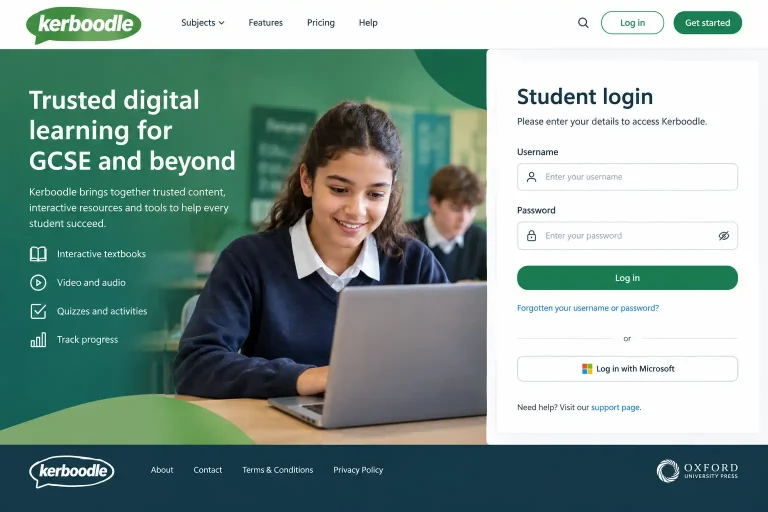
If your school already has access, the Kerboodle sign in process starts from the official Kerboodle website.
Kerboodle login for student access
For teachers
There isn’t a separate process for every individual resource. Once you’re signed in, the course homepage acts as the main starting point for the digital materials available to your account.
Tip: If a resource does not appear after you log in, check that you are viewing the correct course and that your account has been given the appropriate access.
Your Kerboodle Textbook and Digital Books
One of the central features of the Oxford Smart edition is its digital book experience. Student Books and Teacher Handbooks are available from the course homepage rather than requiring students to work from a physical copy alone.
The optimised Digital Books are designed to provide clearer text and images, including a better experience when viewed on smaller screens. They also include tools that allow users to personalise their copies.
This makes the digital textbook useful both during lessons and when students are reviewing material independently.
What can students use the digital book for?
Depending on the course access provided by the school, students can use their digital course book to:
The digital book sits alongside the wider course materials rather than replacing every other resource.
Planning Resources for AQA GCSE Sciences
Planning is an important part of the Oxford Smart edition. The course includes curriculum narratives that show how important concepts develop from KS1 through KS4.
Unit planners provide additional guidance for teachers and are particularly useful for:
These materials can help teachers connect individual lessons with the wider learning journey rather than treating topics in isolation.
Lesson Presentations and Classroom Materials
Teachers can also access front-of-class lesson presentations. These are supplied as PowerPoint presentations and can be edited to suit an existing lesson structure or school template.
That flexibility is useful when teachers want to start with prepared material but still adapt it for their own classes.
The available science resources include materials for Biology, Chemistry and Physics, with further course content being added as the Oxford Smart edition develops.
Practical Science Videos for Students
Practical work can be difficult to revisit once a lesson has finished, particularly when students need to remember specific skills or procedures.
The Oxford Smart science resources include short Required Practical mini-clip videos that students can use to reinforce the skills covered in practical work. Separate videos also address relevant maths skills.
These resources can therefore support revision as well as classroom teaching.
What Resources Are Available?
The course materials are designed to cover several stages of teaching, assessment and independent study.
Resources available for the September launch
The supplied course guidance lists the following materials:
The availability of these resources means teachers can use the platform for more than simply opening a digital textbook.
Additional Content Added During the Autumn Term
The course guidance also outlines further resources planned for regular updates during the autumn term.
These include:
Because the content is updated over time, teachers should check their course resources rather than assuming that every item will be available at the same point.
Student Learning, Homework and Assessments
Ker boodle can also support work that continues beyond the classroom. Students can use the course materials for revision, practical preparation and assigned learning activities where their school has enabled those resources.
Assessment results play an important role in the Oxford Smart system. Completed start tasks can trigger automated next-step activities based on student performance.
These include Level Up Secure and Level Up Extend, while completed assessments can also contribute questions to a Reactivate bank based on spaced retrieval principles.
This approach helps move students from simply completing an assessment towards identifying what they should revisit next.
What Are Kerboodle Answers Used For?
Searches for Ker boodle answers often come from students looking for help with questions or assigned work. However, the supplied Oxford Smart guidance focuses on learning resources, assessments, feedback and next-step activities rather than providing a general answer bank.
Students should therefore use the textbook, teacher-assigned resources, practical videos and assessment feedback to understand the work rather than relying on unexplained answers.
If a particular task is unclear, the most useful next step is usually to check the relevant section of the digital book or ask the teacher who assigned it.
Tracking Progress with Reports
Teachers can use reporting tools to get a clearer picture of student performance across the specification.
The available reports include:
Reports can include statuses such as Developing, Secure and Extending, along with information about completed Next Steps.
This gives teachers a broader view than a single test score and can help identify areas where students may need further support.
Setting Up Teaching Groups
To make the enhanced functionality work effectively, students need to be organised correctly.
The administrator is responsible for creating and managing year groups and placing students in the appropriate groups. Once students are in their year groups, teachers can create teaching groups or classes within their courses.
This setup is particularly important before the start of the academic year because it affects how teachers organise learning and use the available reporting functionality.
Before students begin
Schools should check that:
Taking care of these basics early can prevent access and organisation problems later.
Is Kerboodle Available for Students?
Yes, students can access course materials when their school or institution provides the relevant subscription and account access.
For the AQA GCSE Sciences, Oxford Smart edition, students can access digital learning materials through their course homepage. The exact resources available will depend on the course and access provided to them.
The platform is intended to connect classroom teaching with independent study, giving learners access to books, videos, activities and assessment-related resources in one place.
Student Support and Help
Students who need help using the platform can use the dedicated student support resources provided by Ker boodle.
Teachers can share this support material with learners who are unfamiliar with the platform or need guidance on using its features.
For teachers, additional support is available through dedicated guidance covering different aspects of the platform, including getting started, resources, lessons, digital books, assessment and reporting.
Webinars and Training for Teachers
Teachers who want additional help can take advantage of training opportunities offered for the platform.
The supplied guidance highlights Microsoft Teams sessions designed specifically for teachers, alongside on-demand webinars that can be watched when convenient.
These sessions can be useful when a school is introducing the Oxford Smart edition and staff want to understand how the newer functionality fits into their existing teaching approach.
Need More Help With Your Course?
Schools and teachers can also request a support call with a member of the Ker boodle team at no additional cost, according to the supplied course guidance.
This can be useful when general documentation does not answer a specific question about the science resources or platform functionality.
For broader guidance, teachers who are new to the platform can start with the school’s first-steps information. Existing users can use the dedicated teacher support resources for further hints and guidance.
Kerboodle at a Glance
|
Feature |
What it provides |
|---|---|
|
Digital Books |
Online Student Books and Teacher Handbooks |
|
Lesson Presentations |
Editable PowerPoint-based classroom materials |
|
Practical Videos |
Short clips supporting required practical skills |
|
Worksheets |
Practicals, activities and skills-based materials |
|
Assessments |
Checkpoints, tests and other assessment resources |
|
Next Steps |
Follow-up activities based on student performance |
|
Reactivate |
Retrieval questions generated from completed assessments |
|
Reports |
Knowledge, Task and Skills reporting |
|
Teaching Groups |
Tools for organising classes within courses |
|
Student Support |
Guidance for learners using the platform |
|
Teacher Support |
Guidance, webinars and support opportunities |
Tips for a Better Kerboodle Experience
Common Kerboodle Issues and Solutions
|
Common issue |
What you can do |
|---|---|
|
Ker boodle login not working |
Check your school-provided username and password, then make sure you’re opening the correct course. If access still fails, contact your teacher or school administrator. |
|
Course is missing after sign in |
Confirm that you have opened the correct account and course. Your school may need to check your course access or student account. |
|
Digital textbook is not showing |
Open the course homepage and check the Digital Books section. If it is still unavailable, ask your teacher whether the textbook has been enabled for your account. |
|
Assigned homework cannot be found |
Check the course homepage and the resources your teacher has assigned. If the task is missing, your teacher can confirm where it has been posted. |
|
Practical videos are difficult to find |
Look through the course’s practical resources and Required Practical mini-clips. These videos are designed to help reinforce practical skills and can also support revision. |
|
A question or task is confusing |
Use the relevant section of the digital book, review the supporting resources and assessment feedback, or ask the teacher who assigned the work rather than relying on unexplained answers. |
|
Student account has incorrect access |
Ask the school administrator or teacher to check the student’s year group, course access and teaching group. These settings affect how resources and reporting features are organised. |
|
Teacher cannot see expected student progress |
Check that students are assigned to the correct year groups and teaching groups. Once the setup is correct, teachers can use the available Knowledge, Task and Skills reports. |
|
Resource is not available yet |
Course materials can be added or updated at different stages. Check the current course resources instead of assuming every listed item is already available. |
|
Need more help using the platform |
Students can use the dedicated support guidance, while teachers can access teacher guidance, webinars and support opportunities for additional help. |
Frequently Asked Questions
Conclusion
The Oxford Smart AQA GCSE Sciences edition brings considerably more into the online course environment than a traditional digital textbook. Students can use their course homepage to access digital books and supporting learning materials, while teachers have planning resources, editable presentations, practical content, assessments and reporting tools.
For students, the key starting point is straightforward: use the school-provided account to complete the Kerboodle log in, open the correct course and explore the resources assigned to you. Teachers should make sure year groups and teaching groups are correctly organised so that the assessment, Next Steps and reporting features can be used effectively.