Government Gateway: Create Account, Login & Recovery Guide 2026

Government Gateway is often the starting point for people who need to manage HMRC services online. Whether you are dealing with Self Assessment, business taxes or another registered service, it provides a familiar route to access your tax information securely. Meanwhile, GOV.UK One Login is gradually being introduced across more services, but many existing HMRC users will continue using the uk Government Gateway for the services currently linked to their account.Visit our Homepage for more information.

What Is the Government Gateway?

It provides a secure way to sign in to certain UK government and HMRC online services. Rather than creating completely separate credentials for every eligible tax service, users can use their Gateway details to access services they have registered for.

For example, a business owner may use their account when dealing with Corporation Tax, VAT or PAYE, while an individual may use it for services connected with Self Assessment.

Your government gateway register account normally includes:

  • A government gateway register user ID
  • A password
  • Additional security verification when required

This helps HMRC protect access to personal and business tax information.

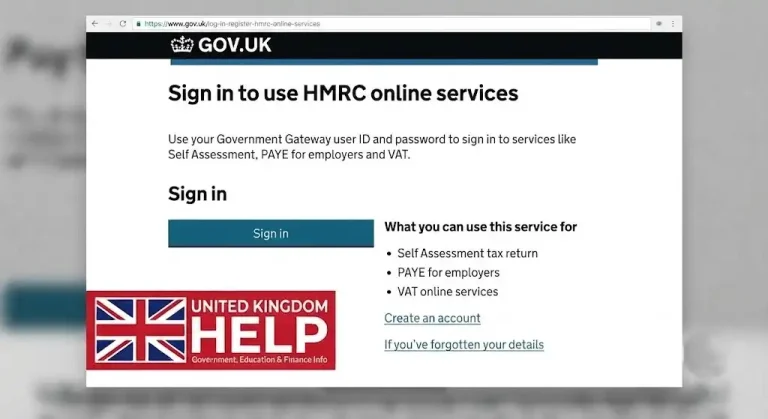
Government Gateway Login: How to Sign In

Once your account is active, the gateway sign in process is generally straightforward.

You usually begin by visiting the specific HMRC or government service you want to use.

The usual process is:

  • Go to the relevant online service.
Government Gateway
  • Select the available sign-in option.
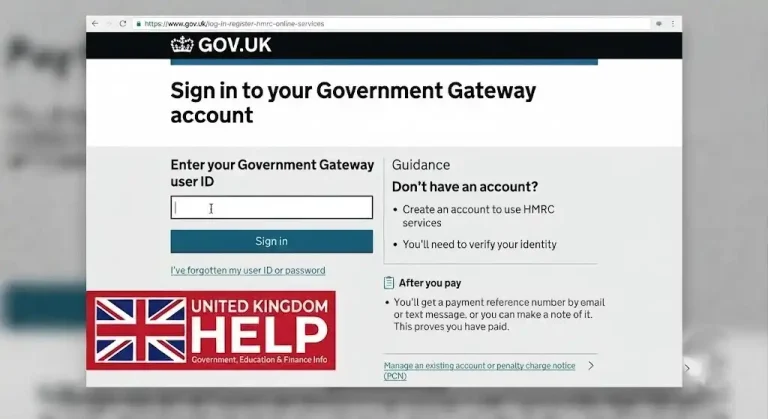
  • Enter your Government Gateway user ID.
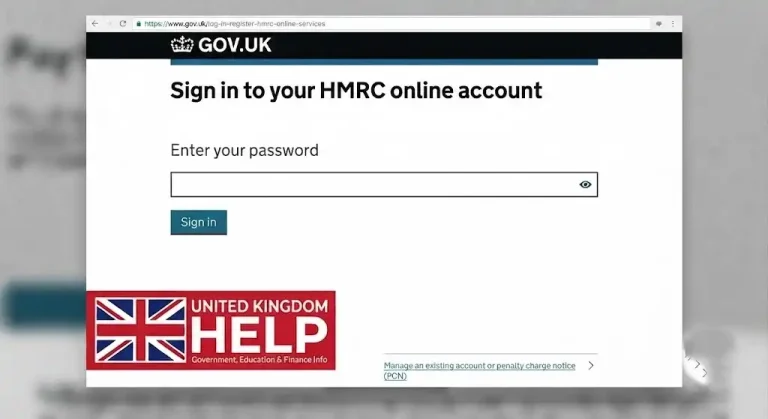
  • Enter your password.
  • Complete any additional security checks requested.
  • Continue to the service or account you need.

Depending on the service and your security settings, you may also need to enter a verification code sent to your registered device or contact method.

Who May Need a Government Gateway Account?

Thegovernment gateway user id is particularly relevant to people and businesses that need to use HMRC services online.

Self-employed people and sole traders

A sole trader or self-employed person may need online access when registering for and managing Self Assessment.

Limited company owners

Company directors and business owners may use HMRC online services to deal with matters such as Corporation Tax and other business tax responsibilities.

VAT-registered businesses

Businesses registered for VAT may need access to the appropriate online services to manage VAT-related obligations.

Employers

Employers may need online access for PAYE and payroll-related reporting.

Not everyone will follow exactly the same registration process, as the account or sign-in route can depend on the service being accessed.

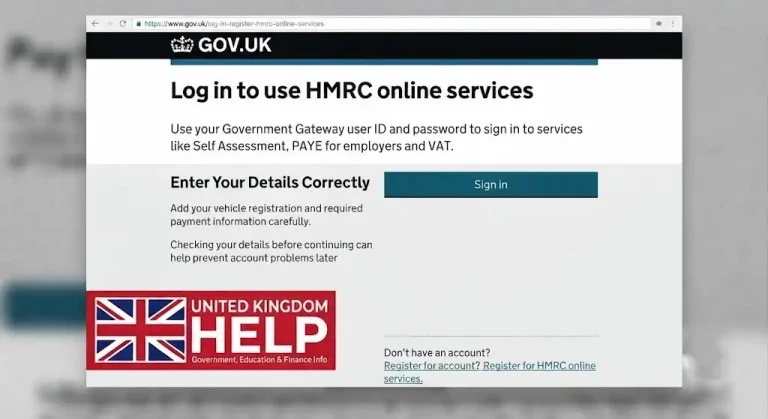
How to Create a Government Gateway Account

In many situations, you do not simply create a Gateway account independently and then decide later which HMRC service to use.

Instead, the account is commonly created as part of registering for an eligible HMRC online service.

For example, you may begin by registering for:

  • Self Assessment
  • Corporation Tax
  • VAT
  • PAYE or employer services

During the registration process, you may be asked to create or use Gateway credentials.

Information You May Need

The information required can vary depending on whether you are registering as an individual or on behalf of a business.

For personal tax services, you may need details such as:

  • Your National Insurance number
  • Your full name and personal information
  • Your date of birth
  • Your address
  • An email address
  • A mobile telephone number

Business registrations may require information including:

  • A Unique Taxpayer Reference (UTR), where applicable
  • A Companies House registration number for a limited company
  • Business contact details
  • The type of tax service you want to register for

HMRC may also carry out identity and security checks before access is granted.

When Will You Receive Your User ID?

After successfully completing the relevant registration process, you may be given a Gateway user ID.

This ID is important because you may need it whenever you sign in to services connected with your account. Keep it somewhere secure and avoid sharing your login details with anyone who is not authorised to access your tax information.

Why You Should Use the Correct Service Page

It is generally best to start from the official page for the particular HMRC service you need.

For example, the route for accessing Self Assessment may differ from the route used for a business tax service. Starting from the relevant official service page can help ensure you are using the correct sign-in method.

What Services Can You Access Through Government Gateway?

It is mainly associated with HMRC’s online tax services, although the services available through it can change as government systems continue moving towards GOV.UK One Login.

For existing users, the account may provide access to a range of personal and business tax services.

Personal Tax Services

Depending on your circumstances and registrations, available services may include the ability to:

  • Manage Self Assessment matters
  • Submit a tax return
  • Check certain tax information
  • Update relevant personal details
  • Manage payments or refunds where the service allows it
  • Access your registered HMRC services

Business Tax Services

Businesses may use Gateway credentials for services connected with:

  • Corporation Tax
  • VAT
  • PAYE
  • Employer reporting
  • Payroll-related information
  • Construction Industry Scheme services
  • Business tax account information

Access depends on which services your business has registered for.

Important: Having Gateway login details does not automatically give access to every HMRC service. You may still need to register separately for particular services.

Gateway Account Recovery

Forgetting your login details is one of the most common problems users experience.

If you cannot remember your Gateway user ID or password, the official sign-in process normally provides options to recover access.

Forgotten Government Gateway User ID

If you have forgotten your user ID, look for the option relating to a forgotten user ID on the official sign-in page.

You may be asked to provide information that helps verify your identity and locate your account.

It can also be worth checking previous emails from HMRC or government services, as your user ID may have been included in earlier account correspondence.

Forgotten Password

If you know your Gateway user ID but cannot remember the password, use the official password recovery option.

You may need to complete security checks before creating a new password.

For security reasons, always reset your details through the official government or HMRC website rather than following links from suspicious emails or messages.

Account Locked After Failed Attempts

Entering incorrect login information several times may temporarily prevent access to your account.

If this happens, follow the instructions displayed during the sign-in process. Depending on the situation, you may need to wait before trying again or complete the password recovery process.

Verification Code Not Arriving

Sometimes users experience problems receiving an access or security code.

Before requesting further help, check:

  • Whether your registered mobile number is correct
  • Whether you have signal or can receive messages
  • Whether the code has been delayed
  • Whether the service offers another verification method

If the problem continues, HMRC’s official online services support may be able to help with technical sign-in issues.

Government Gateway and GOV.UK One Login

The UK government is gradually moving towards government gateway login pension, a newer system designed to provide a more consistent way of accessing government services.

This does not mean that everyone must immediately stop using the hmrc government gateway.

For many existing HMRC customers, government gateway login pension credentials may still be required to access their current services. Meanwhile, new users may encounter GOV.UK One Login when registering for certain government or HMRC services.

The Main Difference Between the Two Systems

Feature

Government Gateway

Main purpose

Access to eligible government and HMRC services

Sign-in details

Gov Gateway user ID and password

Current position

Still used for many existing HMRC services

Registration

Often linked to the service you are registering for

Future direction

Gradual transition of some services

The service itself will normally tell you which sign-in method you should use.

Should You Use Government Gateway or GOV.UK One Login?

The answer depends largely on your circumstances and the service you are trying to access.

If you already have a hmrc government gateway account connected to existing HMRC services, you may need to continue using it unless HMRC provides different instructions.

If you are a new user, some services may direct you towards GOV.UK One Login instead.

There is no need to guess which system applies. Start with the official page for the service you need, and follow the sign-in or registration instructions provided there.

Government Gateway for Business Owners

Business owners often first come across the Gateway when dealing with their company’s tax responsibilities.

Your first registration may be connected with:

  • Corporation Tax after forming a limited company
  • VAT registration
  • PAYE when becoming an employer
  • Another relevant HMRC business service

Once you have access to your registered services, you can manage the relevant tax responsibilities online.

However, each tax obligation has its own registration requirements and deadlines, so having login access alone does not remove the need to understand what your business must file and when.

Important Tax Deadlines to Remember

Your Gateway account can help you manage online tax services, but you are still responsible for meeting the relevant deadlines.

Some common examples include:

  • Self Assessment tax returns: generally due by 31 January following the end of the relevant tax year for online returns
  • Corporation Tax returns: generally due within 12 months after the end of the accounting period
  • VAT returns: often follow quarterly periods, with deadlines depending on the applicable VAT arrangements
  • PAYE reporting: employers generally need to submit payroll information as required for each pay period

Always check the current requirements for your particular tax situation.

Getting Help With Gateway Problems

If account recovery steps do not resolve the issue, make sure you seek help from the correct HMRC support channel.

Technical problems with signing in are different from questions about tax rules, tax returns or payments.

For example:

  • Use online services support for technical access issues
  • Contact the relevant HMRC department for service-specific tax questions
  • Use official GOV.UK guidance for registration and account information

This can save time and help you reach the appropriate support team more quickly.

A Useful Security Reminder

Your Gateway details provide access to sensitive personal or business information.

To protect your account:

  • Never share your password unnecessarily
  • Use official government websites when signing in
  • Be cautious about unexpected emails or messages
  • Do not provide security codes to unknown people
  • Keep your registered contact information accurate

If something about a message or website looks suspicious, avoid entering your credentials until you have confirmed that you are using an official service.

Common Login Problems

Most sign-in difficulties fall into a small number of categories.

Problem

Possible next step

Forgotten user ID

Use the official user ID recovery option

Forgotten password

Reset your password through the sign-in page

Too many incorrect attempts

Follow the account access instructions provided

Security code missing

Check your registered contact details and try the available options

Wrong service

Return to the official page for the service you need

Technical difficulty

Contact the appropriate HMRC online services support

Keeping your contact details up to date can make future account recovery easier.

Quick Overview

The Gateway can currently be used to:

  • Access eligible HMRC online services
  • Manage Self Assessment tax matters
  • Submit VAT information and returns
  • Deal with Corporation Tax obligations
  • Manage PAYE and employer services
  • View personal or business tax information
  • Recover a forgotten user ID or password
  • Access services you have already registered for

The exact sign-in method you need may depend on the government service you are trying to use.

Frequently Asked Questions

A Government Gateway account is worth creating if you need to use HMRC’s online tax services. Your account provides secure access to services connected with personal and business tax matters, using your Government Gateway user ID to identify you.

You will usually need an account if you want to:

  • Submit a Self Assessment tax return.
  • Manage VAT, PAYE or Corporation Tax online.
  • Register or manage certain business tax responsibilities.
  • Check tax information and access relevant HMRC records digitally.

You may not need a new account for every government service, as GOV.UK One Login is gradually being introduced for some services. However, existing Government Gateway users can normally continue using their current details for HMRC services until they are told otherwise.

Creating a new Government Gateway account allows you to securely access eligible HMRC online services. The registration process is completed online, and the information you need may depend on whether you are setting up access for yourself or for a business.

Before you begin, make sure you have access to:

  • A regularly used email address for verification codes
  • Your personal details, including your National Insurance number, where required
  • Business information such as your company name, CRN and UTR, if applicable
  • Any identity documents requested during the verification process

Register Your Sign-In Details

Visit the official HMRC online services page and choose the option to create new sign-in details. You will first be asked to confirm your email address using a code sent to your inbox.

Next, enter the required information, create a secure password and complete the account security steps. Once registration is successful, you will receive your Government Gateway user ID, so keep it somewhere safe.

Finally, choose the HMRC service you want to use, such as Self Assessment or VAT. Some services may require additional identity checks or an activation code before access is fully available.

If you are unable to sign in to your Government Gateway account, there are several ways to regain access. Start by using the official HMRC sign-in help service, where you can recover your User ID, reset your password, or get support with verification problems.

  • Forgotten User ID: Use the sign-in help option and provide the email address linked to your account. It may also be worth checking older emails for messages mentioning Government Gateway.
  • Forgotten password: Choose the password recovery option, enter your User ID and complete the required security checks.
  • Account temporarily locked: Too many unsuccessful sign-in attempts can trigger a temporary lock, which normally clears automatically after 2 hours.
  • Problems receiving a security code: Use the help option shown on the verification screen to explore alternative ways to confirm your identity.

If the website is not working properly, clearing your browser cache and cookies or trying another browser may also resolve the issue.

Creating a Government Gateway account is usually fairly quick. In many cases, you can register online and receive your Government Gateway user ID and password within around 10 to 15 minutes. The exact process can vary depending on the HMRC service you want to access.

For some tax services, registration does not end immediately. You may need to wait for an activation code sent by post before the account is fully connected to that service. This can take 7 to 10 days, and occasionally up to two weeks.

Before you start, it helps to have:

  • An active email address for verification
  • Personal details, such as your National Insurance information
  • A UK passport or driving licence, where required
  • Relevant company details when registering for business tax services

Having these details ready can make the registration process smoother.

Your Government Gateway user ID is the unique sign-in reference created when you register for certain UK government online services, including HMRC accounts. It is generally made up of numbers and can contain up to 12 characters. You need this ID, together with your password, to access your account securely.

You may use your Government Gateway details to:

  • Access services such as Self Assessment, PAYE, VAT and Corporation Tax
  • Submit tax information and returns online
  • Check relevant account details and tax records
  • Sign in to other supported government services

Forgotten Your User ID?

Look through emails received when you registered, as your details may be included there. If you cannot find it, use HMRC’s online sign-in recovery service or contact the appropriate HMRC support team.

Remember: Your Government Gateway user ID is different from your UTR and National Insurance number.

If you already have a Government Gateway account, it is usually best to continue using your existing login rather than registering for another one. Having more than one account can make it harder to manage HMRC services and may create problems when accessing information linked to your original account.

Why keep your existing account?

  • Manage services in one place: Your Government Gateway user ID can be used to access relevant tax and HMRC services.
  • Reduce potential issues: Multiple accounts may cause confusion or difficulties when linking existing services.
  • Add services when needed: Log in with your current details and add another tax, duty or scheme where the service allows it.

Forgotten your login details?

Don’t create a new account straight away. Use the official HMRC online recovery options to retrieve your user ID or reset your password and regain access to your existing Government Gateway account.

Identity verification may be required when accessing certain UK government services. The process usually involves following the instructions provided by the service you are using and, where applicable, proving your identity through GOV.UK One Login.

You may be offered different ways to confirm who you are, depending on your circumstances:

  • Use the GOV.UK One Login app to scan an eligible photo ID document and complete a facial check.
  • Answer security questions online using information linked to your personal or financial records.
  • Visit a participating Post Office branch after completing the required online steps and receiving the relevant reference or barcode.

Make sure your identification details are accurate before starting, as the available verification options can vary between government services.

Having two Government Gateway accounts usually means that separate login details were created at different times. This can happen when registering for another HMRC service and creating a new Government Gateway user ID instead of using an existing account.

Common reasons include:

  • Different registrations: You may have signed up separately for services such as Self Assessment, PAYE or business tax.
  • Personal and business access: One account may be linked to your personal tax affairs, while another is used for a company or organisation.
  • New login arrangements: Changes involving GOV.UK One Login can sometimes make it unclear which credentials you should use.
  • Separate authorised users: Businesses may also have different access arrangements for staff, partners or accountants.

If you’re unsure which Government Gateway account is correct, check the services connected to each login before continuing.

When creating a Government Gateway account, you may not always need to upload physical documents. However, you will normally need personal details and information that can be used to confirm your identity. The exact requirements can vary depending on the government service you want to access.

You may be asked to provide:

  • Your full name and date of birth
  • A National Insurance number or relevant address details
  • An active email address
  • Access to a mobile phone for security codes

For identity verification, you may also need details from documents or records such as a UK passport, photocard driving licence, recent payslip or P60, or information from a previous Self Assessment tax return or tax-related claim. Having these details ready can make registration smoother.

If you cannot remember your Government Gateway password, you can create a new one through the official HMRC sign-in process. Start by opening the relevant Government Gateway sign-in page and choosing the option for a forgotten password.

You will usually need to:

  • Enter the email address linked to your account.
  • Provide your Government Gateway User ID when requested.
  • Confirm your identity using a security code sent to your registered device or email.
  • Enter characters from your recovery word, if you previously created one.
  • Choose a new password and confirm it to finish the reset process.

Make sure the details you provide match the information registered with your Government Gateway account. Once your identity has been verified, you should be able to sign in using your new password.

Final Thoughts

Government Gateway helps individuals and businesses manage important HMRC services online, from tax returns to VAT, Corporation Tax and PAYE. Whether you need to create an account, complete a login, recover forgotten details or understand the available services, the key is to use the correct official HMRC service. Keep your login information secure, follow the relevant guidance, and use the official recovery options whenever you cannot access your account.

Leave a Comment

Your email address will not be published. Required fields are marked *

Scroll to Top