
The NHS Login Portal helps people access a range of UK health and care services online using one set of login details. Instead of creating separate credentials for every supported service, you can use your NHS login email address and password to sign in to participating websites and apps.
Whether you need patient portal NHS login access, want to understand identity verification or are setting up an account for the first time, it is important to know how the process works. NHS login can be used for different purposes depending on the service, including accessing personal health information, online consultations and pharmacy services.
What Is the NHS Login Portal?
NHS login is a secure sign-in system that allows users to access participating health and care websites and applications with a single account. You generally need an email address and password, although some services require additional security checks before granting access to personal information.
The NHS Login Portal is particularly useful for people who want to manage supported healthcare services online without maintaining separate login details for each one. However, having an NHS login does not automatically provide access to every NHS website or health record.
You can check the official NHS list of websites and apps that support NHS login to find out whether your chosen service accepts these credentials.
What can you access with NHS login?
Depending on the service, NHS login may allow you to use:
If you are looking for a patient portal NHS login option, check the sign-in page of your healthcare provider or the relevant NHS service. Not every patient portal uses the same authentication system.
What You Need Before Setting Up Your NHS Login Account
Before creating an account, prepare the information required for registration and verification. The details requested depend on which service you want to access and whether you need to view personal health information.
| Requirement | Why it is needed |
|---|---|
| Email address with more than six characters | To register and receive security codes |
| Mobile phone or landline number | To set up two-step verification |
| NHS number or full name | May be required by some services |
| Date of birth | Helps identify and match your records |
| Postcode | May be requested during verification |
| Accepted photo identification or GP registration details | May be needed to confirm your identity |
You will not necessarily need to provide every item at the beginning. Some services request additional details only when you try to access your health records or other protected information.
Which identity documents can you use?
If your mobile number matches the number registered with your GP surgery, NHS login may use that information to help verify your identity. If it does not match, you may need to complete another verification method.
Accepted identity documents listed in the supplied NHS guidance include:
If you do not have an accepted photo ID, you may be able to verify your identity using registration details from your GP surgery.
These details are:
Contact your GP surgery to request these details if you need this verification option.
How to Create an NHS Login Account
You cannot normally begin registration from a standalone NHS login homepage. Instead, open a participating health or care website or app and look for its NHS login option.
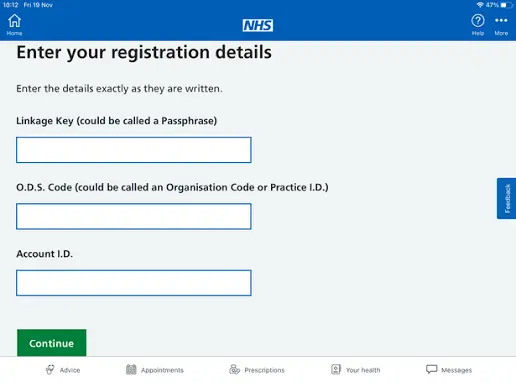
Follow these steps to get started.
Once registration is complete, you can use your NHS login credentials on other participating websites and apps. Some services may request further information before allowing you to access particular features or personal records.
Important point about NHS login online, not app
You do not necessarily need to download an app to use NHS login. You can begin the process through a supported website using a web browser, provided that the service offers this option.
If you prefer NHS login online, not app, open the relevant service’s official website and look for its NHS login button. The available features may differ between the website and its mobile application.
Likewise, an NHS login app is not a universal requirement for every service. Check the instructions provided by the specific website or app you intend to access.
Understanding NHS Login Verification and Account Security
NHS login uses verification measures to help protect accounts and sensitive health information. Email confirmation establishes access to your email address, while two-step verification adds another check using a phone number.
Some services require stronger identity checks before connecting your account to NHS records. This helps ensure that personal information is linked to the correct individual.
If you are trying to continue with NHS login and the service requests additional details, follow the instructions shown on its official sign-in page. The exact process depends on the information the service needs to verify.
Remember: Your NHS login credentials are not necessarily the same as staff or organisational account credentials. If you need NHS staff login, NHS email login or NHS net portal login access, use the appropriate workplace sign-in instructions instead of assuming that a personal NHS login will work.
Frequently Asked Questions
Conclusion
The NHS Login Portal makes it easier to access participating health and care services using one set of login details. Whether you need patient portal NHS login access or want to register for the first time, start by visiting the official website or app you intend to use. Keep your email address and phone number accessible, as you may need security codes to verify your account. Some services also require additional identity checks before showing personal health information. If you experience login difficulties, follow the service’s official guidance and contact your GP surgery when registration details are required.
Read more