
Parent Portal provides a convenient online way for parents and carers to stay connected with their child’s school information, reducing the need to rely on paper letters, phone calls or messages sent home. Depending on the services enabled by your school or council, you may be able to use the portal to check attendance, view progress reports and timetables, read school notices, complete consent forms and receive other school communications. For first-time users, understanding the parent portal login and child-linking process is important because access is connected to a mygovscot myaccount, and your personal details generally need to match the information held by your child’s school.Visit our Homepage for more information.
What is parentsportal?
parentsportal.scot is a digital service intended to improve communication between Scottish schools and parents or carers. Rather than keeping every school communication on paper, the service gives families an online route for viewing and responding to selected school information.
The important point is that it isn’t simply a general website where you create an account and immediately see a child’s records. You first need your own mygovscot myaccount, and then your account has to be linked with your child’s school information.
The official service describes parentsportal.scot as a digital doorway to a child’s school, with access depending on the services made available by the relevant school or council.
From a visitor’s point of view, this distinction matters. If parent portal pkc can log in but cannot see your child, the problem may not be your password. It can be an account-matching or child-linking issue.
Why parents use the Portal
The main reason families use the portal for parents is convenience. School information can be easier to manage when it is available through one account rather than spread across letters, emails and separate processes.
Common uses can include:
Not every family will see exactly the same options. The services available through the parent parent portal depend on what the participating school or local authority has enabled.
That is worth remembering before assuming that a missing feature means something is wrong with your account.
Before You Try to Log In
If you’re visiting the parentportal for the first time, it helps to prepare a few details before starting registration.
You should use your own personal information when creating your mygovscot myaccount. The account isn’t supposed to be created using your child’s identity.
The details held in your myaccount also need to correspond with the information recorded by the school. parent portal admin login west dunbartonshire information does not match, the system may not be able to connect your account to your child.
A useful first-time checklist
Before registration, make sure you have:
One of the most useful things I would check first is whether the school already has the correct contact information for you. A small difference between your details and the school’s records can cause problems later when trying to link the child.
How to Create a Parent Portal Account
Setting up your Portal account involves creating or using a secure mygovscot myaccount and then connecting it with your child’s school record. Follow these steps carefully.
Step 1: Visit the Official Parent Portal Website
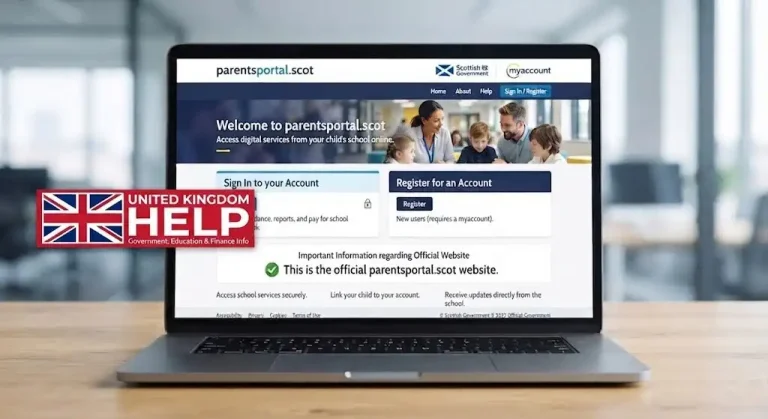
Official parentsportal.scot website
Step 2: Select Sign In or Register
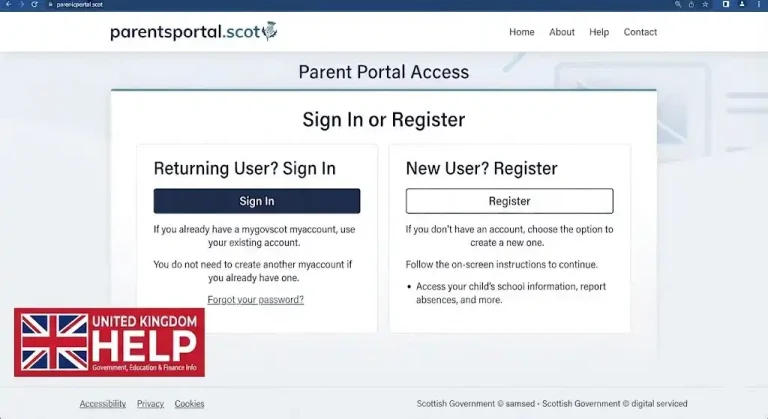
Step 3: Create Your mygovscot myaccount

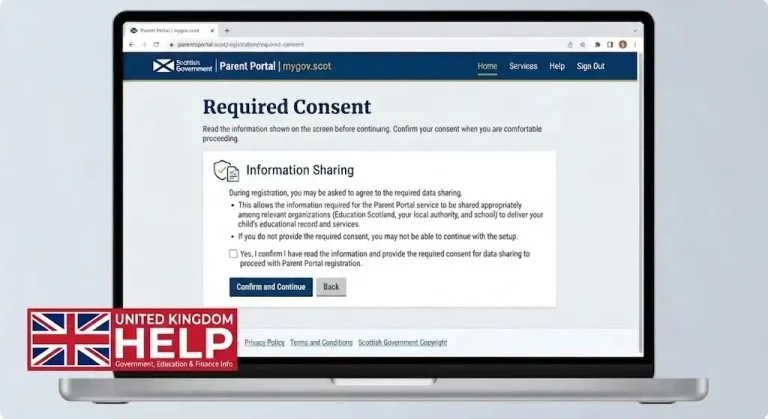
Step 4: Give the Required Consent
Step 5: Link Your Child to Your Account
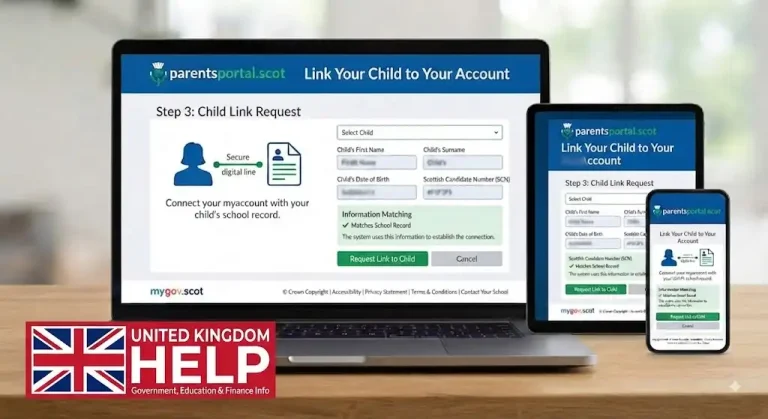
Important: Creating the account and linking your child are two separate stages. Successfully registering your myaccount does not necessarily mean that your child’s school information will immediately appear.
Parent Portal Login: How to Sign In
Once your account has been created and your child has been linked successfully, the parent portal login uk process is relatively straightforward.
Start from the official website rather than an unofficial page:
Parent Portal sign in website
Select the sign-in option and use your existing mygovscot myaccount credentials.
You don’t normally need to create a separate set of credentials specifically for every parents portal sign in session. The myaccount service is used as the secure account connection.
What if you already have mygovscot myaccount?
If you’ve previously created a mygovscot myaccount for another supported Scottish public service, you may already have the account needed to access parentsportal.scot.
In that situation, avoid creating unnecessary duplicate accounts. Try signing in with your existing credentials and then follow the instructions to connect your child.
For account-related assistance, the official Parent Portal guidance also directs users towards their myaccount details when a child-linking attempt fails.
What I Would Check if Login Doesn’t Work
A failed parent portal school login uk doesn’t always mean that your password is wrong.
I’d check these things in order:
The last point is particularly important. If the school holds an old email address, telephone number or other identifying information, changing something only within your online account may not solve the problem.
When Your Child Cannot Be Linked
This is one of the situations that can cause the most confusion for a new visitor.
Imagine you’ve successfully created your account, you can sign in, and everything appears to be working — but your child’s information isn’t showing.
That doesn’t necessarily mean the Portal is unavailable.
The child-linking process relies on matching information between your myaccount and the school’s records. Official guidance for failed linking attempts specifically explains that users should check and update their myaccount details.
The practical solution
First, review the details associated with your mygovscot myaccount.
Then compare them with the information you have provided to your child’s school.
If something is outdated or different, contact the school office. The school may need to carry out security checks before helping you connect the account.
Don’t repeatedly create new accounts just because the first linking attempt fails. In many cases, checking the existing information is the better first step.
Features You May See
After successful linking, the parents portal can become much more useful because the dashboard can provide access to school information relevant to your child.
The exact options vary, but common areas include:
|
Area |
What you may use it for |
|---|---|
|
Attendance |
Check attendance information for the school year |
|
Absence |
Notify the school when your child is absent |
|
Reports |
View available academic progress reports |
|
Timetable |
Check a child’s class timetable where provided |
|
Notices |
Read school communications and updates |
|
Permissions |
Complete electronic consent forms |
|
Calendar |
Keep track of school dates and events |
|
Personal details |
Review or update relevant contact information |
The availability of individual services can depend on the participating school or council, so your dashboard may not look identical to another parent’s.
Checking Student Progress
One reason parents return to the parent portal parent portal is to keep up with their child’s progress without waiting for a paper report.
Where the school provides the feature, parents may be able to view academic reports or progress information online.
This can be useful when you want to look back at information later. Instead of searching through a drawer for an old letter, you can check whether the relevant report is available through your account.
A timetable may also be available, particularly for secondary school pupils. This can help parents understand what subjects their child is scheduled to attend during the school day.
Remember, though, that these functions aren’t necessarily identical for every school.
Attendance and Absence Reporting
Attendance is another practical reason to use the service.
If your school provides online absence reporting, you may be able to tell the school that your child will not attend without making an early-morning telephone call to the school office.
For a parent managing a busy morning, that can be a genuine time-saver.
The portal may also allow you to review attendance information for the current school year. This gives you a clearer picture of recorded attendance and can help you spot information that needs clarification.
A small but important tip
Don’t assume that every Scottish school uses every parent portal pkc feature.
If you don’t see an attendance button, absence-reporting option or another function mentioned in a general guide, check with your school rather than assuming that your account is broken.
Keeping Details Up to Date
Your online account is only as useful as the information connected to it. If your email address, telephone number or other relevant details have changed, check whether they need to be updated.
This is especially important when you’re having trouble linking a child. The school may have older information in its records, while your myaccount contains newer details.
Rather than repeatedly attempting the parent portal login, check the information first.
What to review
If the information held by the school is incorrect, contacting the school office is normally the sensible next step.
What If My Child Is Missing From the Parent Portal?
A common concern is successfully signing into the portal parent portal but not seeing the expected child information.
There are several possible reasons. Your account may not have been linked successfully, or the information in your myaccount may not match the school’s records.
The official terms explain that parentsportal.scot works with the SEEMiS school management system and uses myaccount for authentication.
Try this approach
First, sign out and sign back in to make sure you’re using the correct account.
Next, check your personal details in myaccount.
Then, check whether the school has your current details.
If everything appears correct but your child still cannot be linked, contact the school. You may be asked to provide information so the school can verify that you have the appropriate access.
Avoid creating several accounts simply because one linking attempt didn’t work. That can make an already confusing situation harder to resolve.
Parent Portal Not Showing a Feature?
Another situation you might encounter is a dashboard that looks different from what another parent describes.
For example, one family may have an attendance option while another may not see it. One school might use electronic permission forms, while another may handle those requests differently.
That doesn’t automatically mean your parents portal account is faulty.
parentsportal.scot provides a growing range of services, but the specific services available can depend on the participating school or local authority. The official terms describe functions that can include education information, school-trip permissions, placement requests and parents’ evening bookings.
So, if an option isn’t visible, check with your school before spending time troubleshooting your browser or account.
Using the Safely
Because the service can provide access to information relating to your child, account security should be taken seriously.
Your myaccount credentials should be treated as private. Don’t give your password to another person just because they want to help you access the parent parent portal.
A few sensible habits can make your account safer:
The official service provides privacy information explaining how information is handled within parentsportal.scot and how users can manage certain data-sharing choices.
Privacy and Your Information
It is reasonable to want to know what happens to information connected with your account.
The official privacy notice states that users can access information held about them through their profile and can raise a support request for additional information. It also explains rights relating to access, rectification and erasure.
This is useful to know if you’re concerned about outdated personal information.
If you need information corrected or have a specific privacy concern, use the official support facilities rather than relying on advice from an unrelated website.
A Practical Experience
From a parent’s point of view, the biggest advantage isn’t necessarily one particular feature. It’s having a central place to check school information.
Imagine a normal weekday morning.
Your child is unwell, so instead of searching for a telephone number or looking through old school messages, you check whether your school provides an online absence-reporting option. Later, you might return to the same account to look at a school notice or check another piece of information.
On another day, you may want to find a report or timetable without searching through paperwork at home.
That’s where the portal for parents can become genuinely useful.
The experience isn’t identical for everyone, though. Your school and local authority determine which services are available, so it’s better to think of parentsportal.scot as a central access point rather than a single identical dashboard for every Scottish family.
Portal Login: Quick Troubleshooting Guide
If your portal login isn’t working, work through the problem logically instead of immediately creating another account.
|
Problem |
What to check |
|---|---|
|
Can’t sign in |
Check your myaccount credentials |
|
Child isn’t visible |
Check the linking process |
|
Details don’t match |
Compare myaccount and school records |
|
Feature is missing |
Ask whether your school provides it |
|
Old contact information |
Update the relevant records |
|
Still unable to access information |
Contact the school or official support |
This approach can save time because it separates account problems from school-record problems.
When Should You Contact the School?
The school is often the right place to contact when the issue concerns your child’s records.
For example, contact the school if:
Don’t send sensitive information to an unofficial website simply because it claims to offer Parent Portal assistance.
Parent Portal Scotland: Final Checklist
Before considering your account fully set up, make sure you can answer yes to the relevant points:
FAQs
Conclusion
The Scottish Parent gives parents and carers a convenient way to stay connected with their child’s school information online. With a mygovscot myaccount and a successful child link, parents may be able to access attendance, school reports, timetables, notices, permissions and other school communications. The exact services available can vary between schools and councils.
For a smoother portal login uk experience, keep your personal details accurate and make sure they match the information held by your child’s school. If your child or a particular service does not appear, check your account details first and contact the school if needed. Always use the official parentsportal.scot website, protect your myaccount credentials and avoid unofficial login pages.